Get a Demo
Assign + Track + Recover, One System

Asset Management System to Track, Assign, and Recover With Confidence

Monitor all the laptops, ID cards, and equipment that your organization owns. Allocate all the resources when onboarding, monitor them through real-time tracking and finally collect them upon their exit while maintaining a digital record of each process.


1,000+ Companies
ISO 27001
CMMI Level 5
Audit-Ready Records
Asset LifecycleFrom assignment to return
Live
Asset AssignedTagged and logged to the employee
Done
Usage TrackedVisible on the live dashboard
Done
Maintenance DueWarranty and service reminders
Checking
Replacement RequestedGuided workflow, no email chase
Done
Handover CompleteSynced with exit formalities
Done
Trusted by leading organisations across the globe
Quick Definition

What Is an Asset Management System?

An asset management system tracks company-owned equipment, from laptops and ID cards to machinery and tools, from the day it's assigned to the day it's returned. Every asset gets a unique digital record, so HR and admin teams always know who has what, and nothing goes missing between one employee's exit and the next hire's first day.
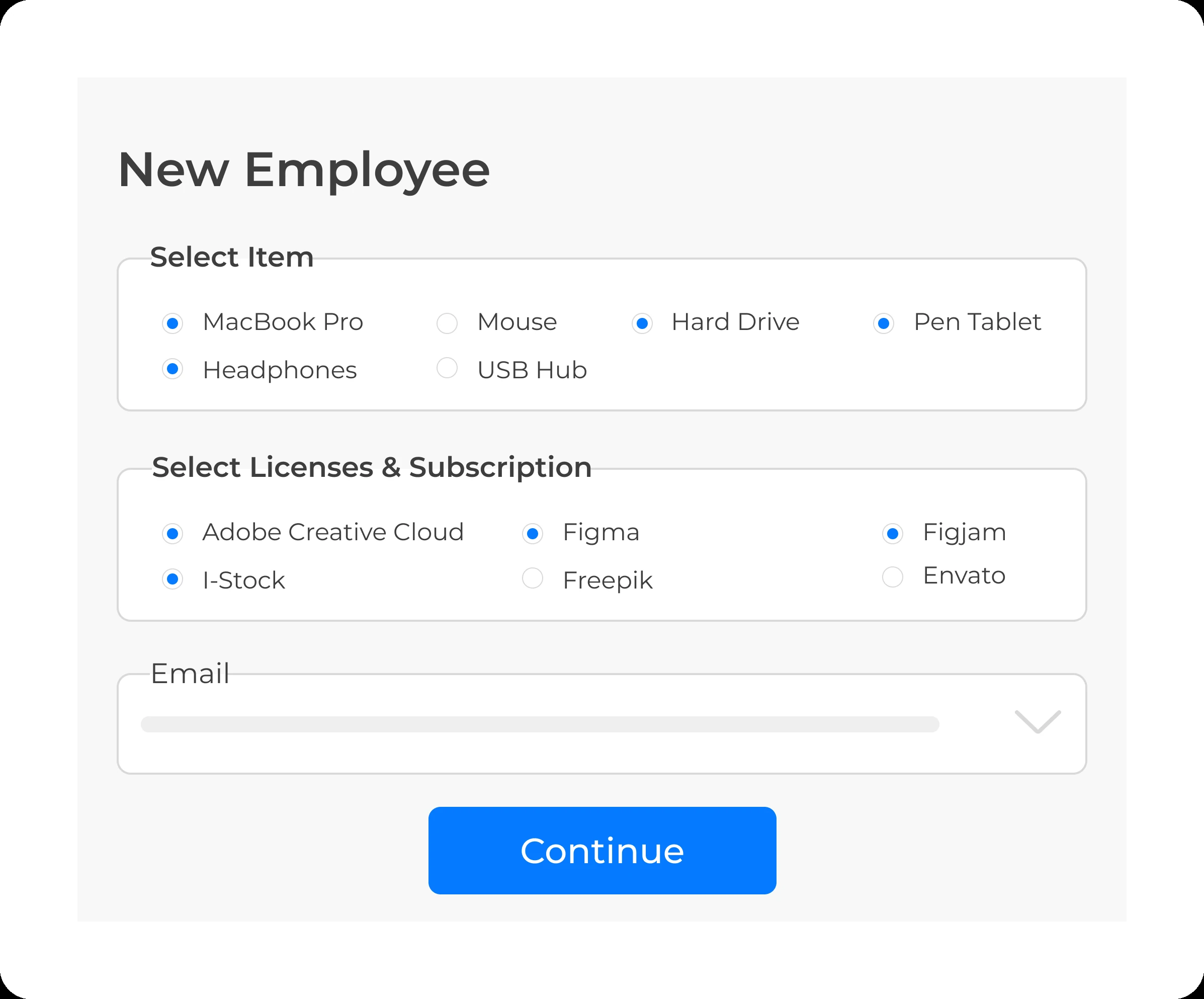
Assigning company assets to a new employee
Problems We Solve

The Asset Tracking Problems Costing You Money

Most of this stays invisible until an audit, a resignation, or a missing laptop forces the question.

No One Knows Who Has What

Laptops, ID cards, and equipment are handed out with no central record of who's holding them.

✓ One record per asset, always current

Onboarding Delays

New employees are waiting for equipment due to lack of information about its availability and whereabouts.

✓ Assign at onboarding, not after

Assets Lost at Exit

Employees leaving with company laptops that no one bothered to reclaim.

✓ Handover tied to exit clearance

No Audit Trail

No record of purchase price, warranty status, or maintenance history when finance asks.

✓ Full history, audit-ready anytime
See How TankhaPay Fixes This
Key Features

Everything You Need to Manage Company Assets

From the day an asset is issued to the day it's returned, and every record in between.

Track Assets & Maintain Records

Secure the name, category, serial number, and status for every item. Full visibility, zero guesswork.

Smart Assignment

Tag and assign assets to new hires as soon as they join, with a clear record of who's responsible.

Live Tracking Dashboard

View all issued, pending, and returned assets on a single dashboard.

Auto-Generated Logs & Reports

Automated logs of all handovers, returns, and replacements, complete with evidence.

Request & Replacement Flow

Staff submit requests for additional equipment or damaged equipment through a predefined workflow process.

Exit-Ready Handover

Every issued asset tracked against each employee at exit, with automated recovery reminders.

Maintenance & Warranty Alerts

Keep track of service schedules and warranty periods and get alerts when they expire.

Audit-Ready Documentation

Invoices, service records, and full asset history are available whenever finance or audit needs them.

Book a Demo
The TankhaPay Difference

Assets Tied to Employee Records, Not a Separate Spreadsheet

An asset tracking system operating on its own won’t be able to tell when people arrive or depart. TankhaPay can because of how the two are related; the assignment of assets takes place automatically upon boarding, and asset retrieval is tied to the departure procedure.
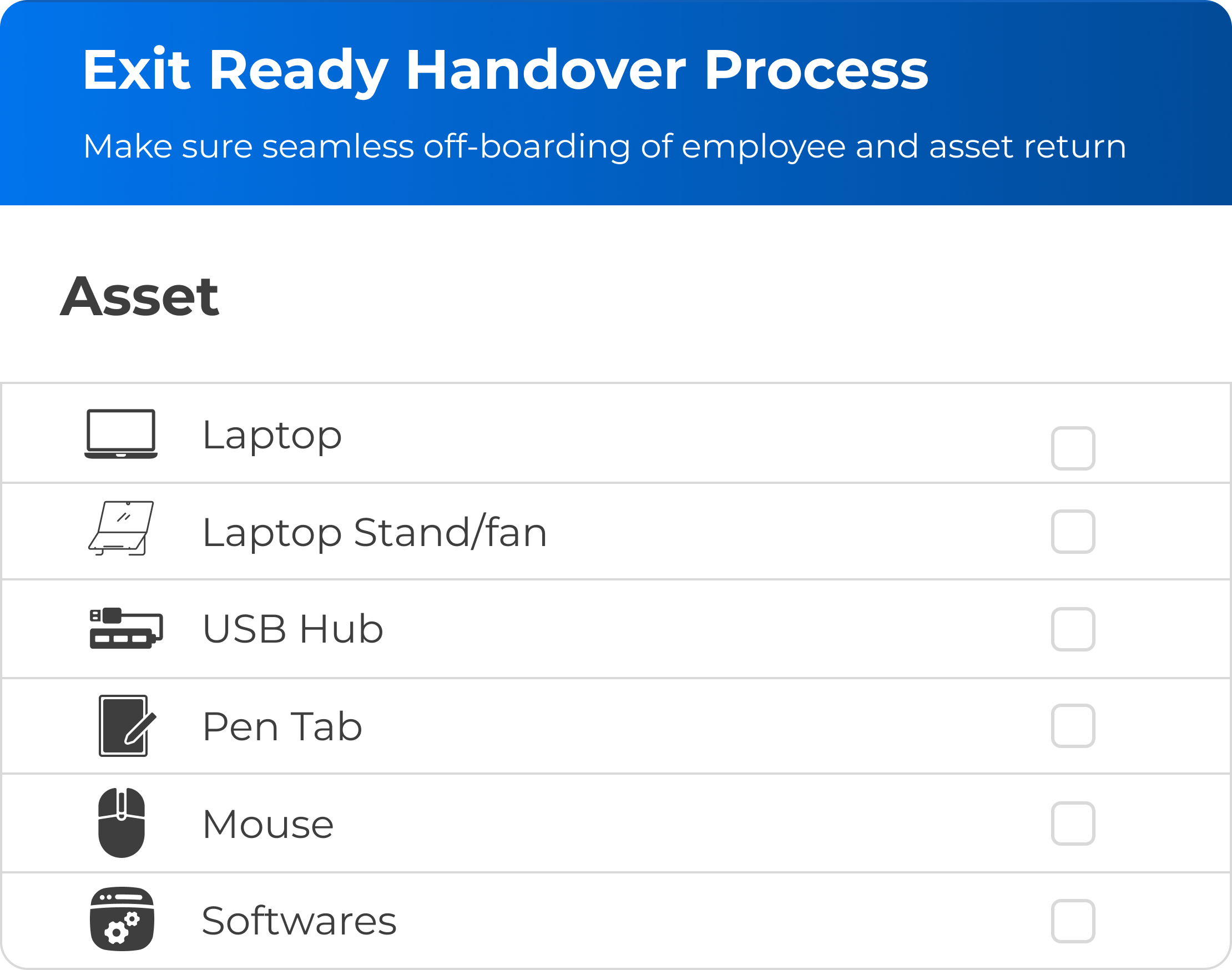
  • New hires get equipment assigned as part of onboarding, not a separate step
  • Exit clearance and asset recovery run from the same employee record
  • No re-entering the same asset data into a second system
See It In Action
Exit-ready asset handover process synced with employee offboarding
Built for Complex Organisations

Built for How Large Organisations Actually Track Assets

IT and admin teams need day-to-day control. HR and finance leadership need the audit trail. TankhaPay serves both from the same platform.

For IT & Admin Teams

  • Assign and unassign equipment without manual spreadsheets
  • Instant filtering of assets by their location, departments, or category
  • Reminders about warranties and maintenance before breakdowns occur
  • Workflow for requesting and replacing all the equipment
Get Started

For HR & Finance Leadership

  • Complete audit history for each asset and department
  • Usage and depreciation information to inform procurement processes
  • Exit clearance details prior to processing of settlement
  • Documents prepared at once for any audit requirement
Talk to Sales
How It Works

From Assignment to Return, in One Flow

1

Add the Asset

Record logs, category, and transaction information just once.

2

Assign It

Link the asset to an employee, department, or project.

3

Track It

Usage and maintenance history can be viewed instantly.

4

Recover It

All assets linked to an actual employee account and not a mere spreadsheet entry.

Where It Connects

Connects to Every Stage of the Employee Journey

Asset tracking that lives on an island doesn't help anyone. This one doesn't.

Employee Records

Every asset tied to a real employee profile, not a loose spreadsheet row.

Onboarding

Equipment assigned as new hires are set up, not a separate step afterward.

Exit Clearance

Recovery tied directly to the offboarding and settlement process.

Finance & Depreciation

Purchase price and usage data available for procurement decisions.

Why TankhaPay

Why Not Just Track Assets on a Spreadsheet?

A spreadsheet can list a laptop's serial number. It can't tell you it's still with someone who left three months ago.

 Spreadsheets & Manual LogsTankhaPay
Assignment recordsUpdated when someone remembers✓ Logged automatically, always current
Exit recoveryEasy to miss during offboarding✓ Tied directly to exit clearance
Maintenance trackingNo reminders, warranties lapse unnoticed✓ Automated alerts before they lapse
Audit readinessReconstructed under deadline✓ Full history, available anytime
Onboarding handoffSeparate process, separate delay✓ Built into the same employee record
HR Insights

Learn More About Asset & Employee Lifecycle Management

Practical guidance for HR and admin teams managing equipment across onboarding and exit in 2026.

FAQs

Questions Before You Book a Demo

What is an Asset Management System in HRMS?
The HRMS Asset Management module enables firms to manage assets distributed among their employees. Assets can be computers, mobile phones, ID cards, or any other kind of asset that an employee may be using. All information about each asset is centralised in one database.
Why is asset management important for organisations?
In the absence of an asset tracking process, assets may be lost, underused, or even ignored. With asset management, all items belonging to your organisation are monitored from their allocation to their disposition. Asset management helps maintain your records in order and saves you money.
How does Asset Management module work?
The Asset Management module lets you add, allocate, and manage all your assets using a single dashboard. Every asset comes with a unique ID number and digital footprint that will enable you to keep track of its entire lifecycle from its issuance till its return without any ambiguity.
Can the system track both physical and digital assets?
Yes. The tracking process is possible not only in cases of physical resources (like laptops or tools) but also for intellectual property (software licenses or user credentials). Thus, every resource of the company, either physical or intellectual, can be tracked.
Does the software allow assigning assets to specific employees or departments?
Indeed, this can be done. The assets could be allocated on a personal basis or by department or even projects. The system makes it very clear as to who owns the particular asset.
How does the system handle asset transfers or returns when employees leave or switch roles?
When an employee leaves or transfers from one area to another, the system triggers the return or transfer of the assets. The Human Resource Department or the administration can kick-start and record this in digital format to make sure that all assets are accounted for.
Can an asset management system generate reports on asset usage and depreciation?
The answer is affirmative because there are enough records produced regarding asset allocation, usage, and depreciation. It helps both HR and finance departments plan maintenance and replacements on a factual basis.
Is there a way to manage asset maintenance schedules and warranties?
Absolutely. An asset management system helps to record warranties, maintenance schedules, vendor information, etc. Reminders are sent out to keep track of renewals and maintenance of your company assets.
How does asset management improve accountability and reduce losses?
The system traces all the asset movements, starting from the time an asset is issued until it is returned. Employees feel that the assets have been assigned to them, thereby minimising the risks of loss or misuse.
Can Asset Management module integrate with inventory or finance systems?
Of course, it is able to interface perfectly well with inventory and finance management systems, allowing for smooth communication between different divisions within the company. The system will allow you to track all expenses associated with assets, their depreciation and acquisition automatically.

Still have questions? Call 989-198-8811 →

Page last updated: 28 July 2026

Talk to Us

Ready to Bring Order to the Chaos?

Manage all company assets efficiently so your team spends time on performance, not tracking possessions.

TankhaPay by AKAL

HRMS  •  Payroll  •  Attendance  •  Compliance

+91 989-198-8811 sales@tankhapay.com

Submit your enquiry

We respond within 24 hours.

1,000+ businesses already trust TankhaPay

Ready to Bring Order to the Chaos?

Manage all company assets efficiently so your team spends time on performance, not tracking possessions. Keep inventory accurate and maintain full accountability without extra effort.

Book a Demo → 📞 989-198-8811
✓ No commitment required ✓ Free 30-min consultation ✓ Response within 24 hours