Get a Demo
Submit + Approve + Reimburse, One Flow

Expense Management Software for Businesses That Want Control & Visibility

Employees can upload bills, submit claims, and track approvals, all from a single, easy-to-use platform.


1,000+ Companies
ISO 27001
CMMI Level 5
Payroll-Synced
Claim FlowFrom receipt to reimbursement
Live
Claim SubmittedPhoto, category, and amount
Done
Policy CheckedOut-of-policy claims flagged
Done
Manager ApprovedRouted automatically
Reviewing
Synced to PayrollNo manual entry needed
Done
ReimbursedRecorded, audit-ready
Done
Trusted across India's leading organisations
Quick Definition

What Is Expense Management Software?

Expense management systems automate the process of recording, approving, and paying for employee-related expenses like travel expenses, food, or office stationery. In the case of TankhaPay, this system automatically applies your spending policy and approves the claims without the need to enter the expense twice in payroll.

Paperwork & Email Chains

Photographed receipts sent in emails that get lost somewhere between your inbox and the finance department.

✓ Submit in seconds, from the app

No Policy Enforcement

Out-of-policy claims slipping through because nobody's checking manually.

✓ Automatically flagged

Slow Reimbursements

Claims sitting in someone's inbox for weeks before anyone approves them.

✓ Routed automatically for approval

No Spending Visibility

Finance finding out about spending trends only at month-end close.

✓ Real-time dashboards
See How TankhaPay Fixes This
Claim Submission

Submit, Review, Reimburse

Skip the paperwork and emails.

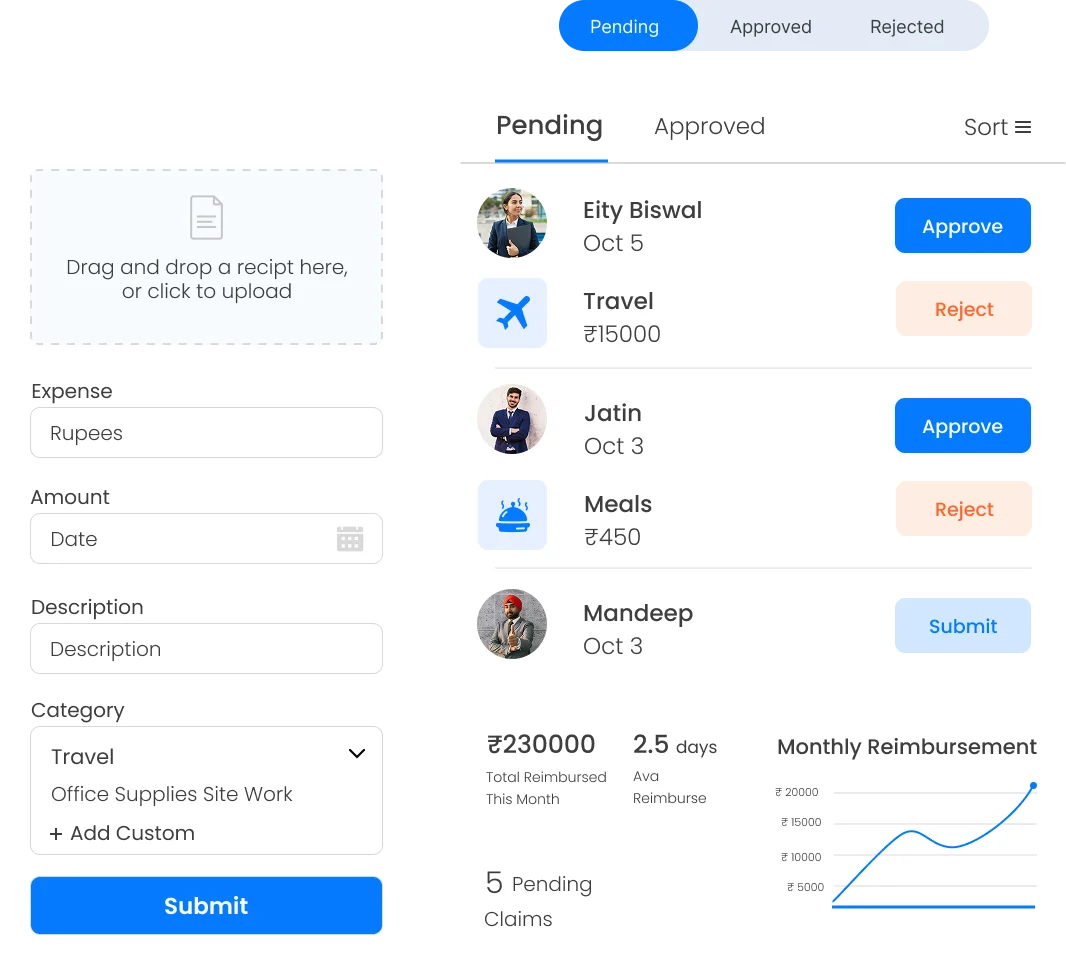
  • Employees take a picture of their expense receipt, enter details, and upload their expenses using the mobile application.
  • Claim expenses incurred while travelling, for office purchases, meals, site visits, or any other customized category.
  • Managers approve, modify, or decline submitted expenses instantly without manual processing.
  • The reimbursement process becomes faster and easier to understand for all concerned.
Book a Demo
Submitting and reviewing expense claims
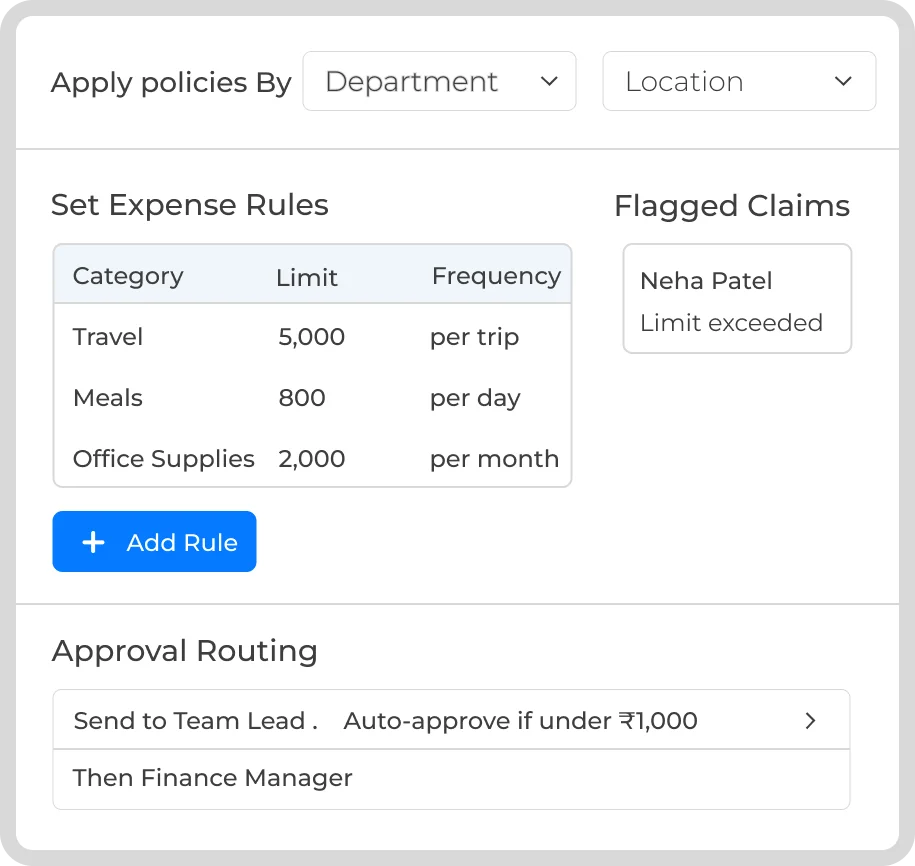
Setting expense policies and approval flows
Policy Control

Set Clear Policies

Define and enforce rules that match your organisation's needs.

  • Create and implement rules based on the requirements of your organization.
  • Imposing limits and categorizing various kinds of expenses.
  • Approval routing rules for sending the claims to the appropriate managers automatically.
  • Policies can be customized based on department, role or location.
  • Out-of-policy and limit-exceeding claims will be identified automatically.
See It In Action
Finance Sync

Keep Finance in the Know

Keep your books up-to-date and ensure that reimbursements are timely.
  • All claims are automatically processed and paid via payroll.
  • Synchronize with accounting systems for efficient and accurate expense reporting.
  • Get an auditable record of every claim and approval made.
  • Easily perform end-of-month and audit tasks with organised expenses.
Book a Demo
Syncing approved expenses with payroll and accounting
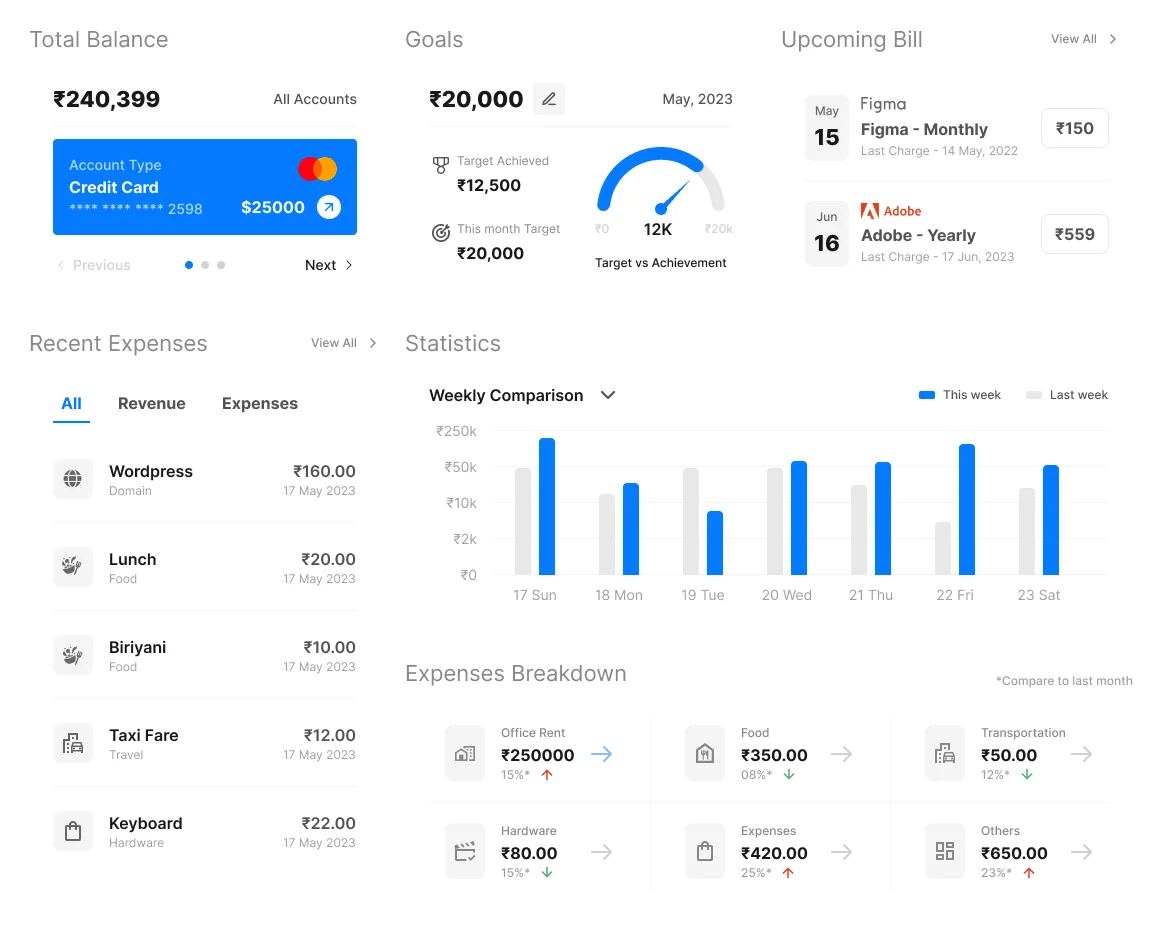
Analysing spending trends and expense reports
Insights

Analyse and Optimise Spending

Use your expense data to create financial insights.

  • Track your expenses for specific projects, departments, or groups within your organization.
  • Find recurring expenses, unnecessary expense claims, or areas where you could save money.
  • Create in-depth reports for better budget planning and forecasts.
  • Compare your expenses to your policies and budgets.
See It In Action
Also Included

What You Can Do

The everyday capabilities that make expense management genuinely self-service.

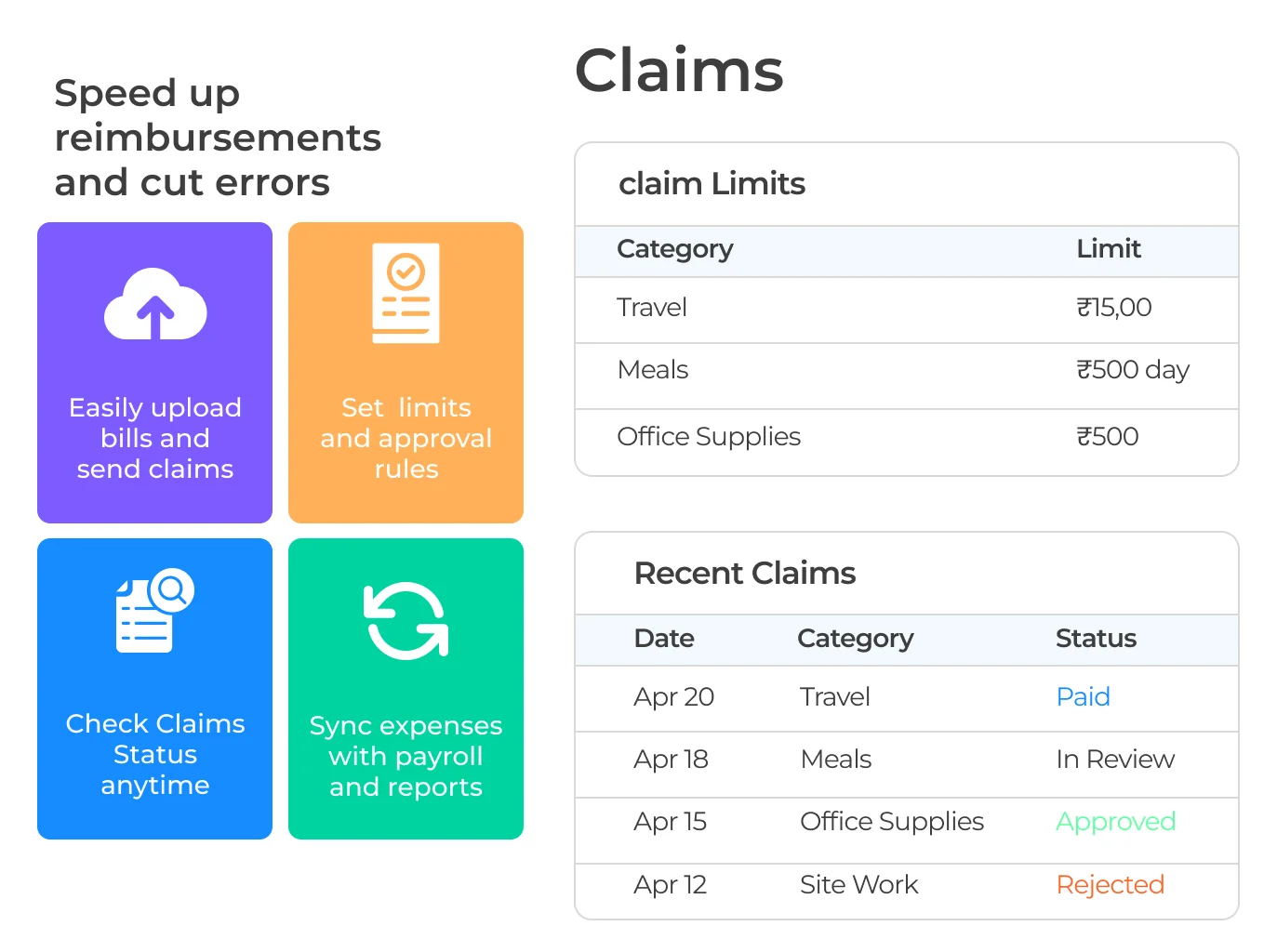
Upload Bills, Send Claims

Easily upload bills and send claims straight from a phone.

Set Limits & Rules

Approval rules and category limits, defined once and enforced automatically.

Check Status Anytime

Employees see exactly where their claim stands; no need to ask HR.

Synced with Payroll

Approved expenses flow into payroll and reports automatically.

Book a Demo
Built for Complex Organisations

Built for How Large Finance Teams Actually Manage Spend

Both finance and employees require systems that provide auditability and enforced policies. TankhaPay fulfils both these requirements through the same system.

For Finance Leadership

  • Real-time dashboards on spending trends in different departments.
  • Out-of-policy claim requests are identified automatically even before approval.
  • Audit-ready records for the end of the month.
  • Direct integration with the payroll and accounting system without any reconciliation required.
Talk to Sales

For Employees & Managers

  • Submit a claim in seconds with a photo of the receipt.
  • Check claim status anytime, without chasing finance.
  • Managers approve or reject in real time, from anywhere.
  • Faster reimbursement cycles, no weeks-long wait.
Get Started
How It Works

From Receipt to Reimbursed, in One Flow

1

Snap the Receipt

Photo, category, and amount, from the app.

2

Policy Checked

Out-of-policy claims flagged automatically.

3

Manager Approves

Routed automatically, reviewed in real time.

4

Reimbursed via Payroll

Synced automatically, no manual entry.

Why TankhaPay

Why Not Just Track Expenses in Excel?

A spreadsheet can hold last month's claims. It can't flag a policy violation before it's approved.

 Excel & Email ClaimsTankhaPay
SubmissionPhotos emailed, manually logged✓ Submit in seconds, from the app
Policy enforcementChecked manually, if at all✓ Flagged automatically
Approval speedSits in an inbox for weeks✓ Routed and reviewed in real time
Payroll syncRe-entered manually✓ Automatic, same platform
Spending visibilityKnown only at month-end✓ Real-time dashboards
HR Insights

Learn More About Expense & Reimbursement Management

Practical guidance for finance and HR teams controlling spend in 2026.

Transparent

Every submission, approval, and payout visible in one place.

Compliant

Policies enforced automatically, not left to manual checks.

Audit-Ready

Clean, organised records the moment anyone needs them.

Trusted by 1,000+ Businesses

Expense Management Made Effortless

Expense management in a business need not be complex. TankhaPay makes it easy for you to manage your expenses by making it easy for you to submit, approve, and get reimbursements done. Everything is made easy to track and is always in compliance with rules and regulations.

FAQs

Questions Before You Book a Demo

What is an expense management system?
An expense management system is an electronic application used to automate the process of tracking, reviewing, and making reimbursements of employee expenses, including travel costs, food bills, office supplies, or client entertainment.
How does an expense management system work?
Expenses incurred by employees can be submitted together with receipts, which are then reviewed by managers, and if approved, processed for reimbursement within the system.
What types of expenses can be managed using the system?
It is generally used for handling expenses related to business operations, like traveling, accommodation, food, fuel, cell phone reimbursement, client meetings, and others.
Can employees upload receipts digitally?
Yes, in most systems, the employees can upload the receipts by taking images or scans of the same using the mobile app, which are automatically linked with the expenses.
How does the system ensure policy compliance?
The policies regarding the expenses can be set up beforehand on the platform. The system automatically identifies any policy violation claims, double submissions, and absence of receipts.
Can expense management software integrate with payroll or accounting tools?
Yes, TankhaPay’s expense management module is compatible with HRMS, ERP, and accounting systems.
How does automation benefit the expense approval process?
Automation helps in speeding up the entire process by automatically submitting the claims to appropriate approval authorities.
Can expense limits or categories be customized for different employees or departments?
Yes, businesses can set different thresholds for categories as well as approvals based on different departments, positions, or ranks.
Is it possible to track and analyze company-wide spending trends?
Yes, absolutely, as most of the systems come with the option of generating reports for finance department needs.
How secure is employee financial and expense data?
Top expense management solutions incorporate secure cloud storage, data encryption, and role-based access to make sure that everything is safe.

Still have questions? Call 989-198-8811 →

Page last updated: 28 July 2026

Talk to Us

Smarter Expenses, Faster Approvals

Simplify submissions, speed up reimbursements, and keep your finance team in control, all from one platform.

TankhaPay by AKAL

HRMS  •  Payroll  •  Attendance  •  Compliance

+91 989-198-8811 sales@tankhapay.com

Submit your enquiry

We respond within 24 hours.

1,000+ businesses already trust TankhaPay

Control Your Spend, Without the Chaos

Fewer delays, fewer errors, and full visibility into where your money's actually going.

Book a Demo → 📞 989-198-8811
✓ No commitment required ✓ Free 30-min consultation ✓ Response within 24 hours