Get a Demo
Log + Approve + Pay, One Flow

Track Time Where It Matters Most

Manage your working hours effectively through Timesheets. Regardless of whether your employees are working from site, remotely, or out in the field, managing time will continue to be easy and accurate for you.


1,000+ Companies
ISO 27001
CMMI Level 5
Timesheet FlowFrom clock-in to payslip
Live
Clock InGeofenced, location-verified
Done
Task TaggedLinked to project or client
Done
Hours LoggedBreaks and totals captured
Tracking
Manager ApprovedReviewed with a single click
Done
Synced to PayrollNo manual entry required
Done
Trusted across India's leading organisations
Quick Definition

What Is a Timesheet, and Why Does It Matter?

The timesheet is the document that records the hours worked by an employee in a particular day, week or month. It helps the companies to know about their productivity, pay the correct wages to their employees and comply with labor laws. TankhaPay’s timesheet application does even more.

Chasing Spreadsheets

Time spent tracked in spreadsheets, sent out via email at month-end, half of them incomplete.

✓ One digital log, always current

No Project Visibility

Lack of visibility on where time is spent on any particular project or client.

✓ Time tagged to task or project

Payroll Disputes

Disagreements over hours worked with no clean record to settle them.

✓ Approved hours flow straight to payroll

Proxy Check-Ins

No way to confirm someone actually clocked in from where they said they were.

✓ Geofenced, location-verified logging
See How TankhaPay Fixes This
Clock In & Out

Detailed Clock In and Out

Move beyond basic punch-in/punch-out systems and capture meaningful work details.
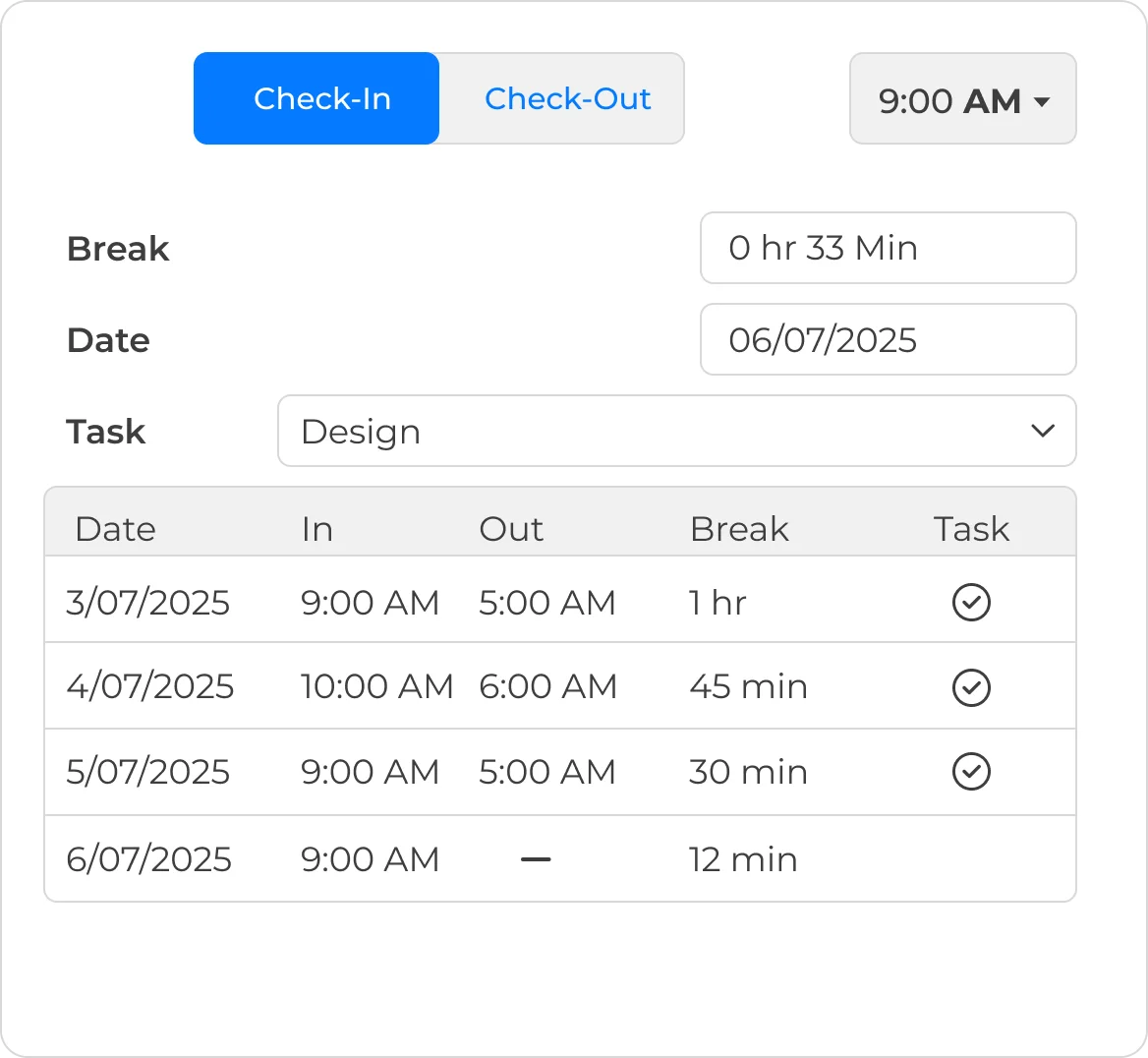
  • Employees can quickly enter start and end times either daily or weekly
  • Breaks are added to provide accurate hours spent working
  • Label tasks, projects, or clients to connect time entries with real tasks
  • Managers can then review, approve, or modify timesheets in one click
  • An efficient way to maintain records of employee work hours
Book a Demo
Detailed clock in and out with task tagging
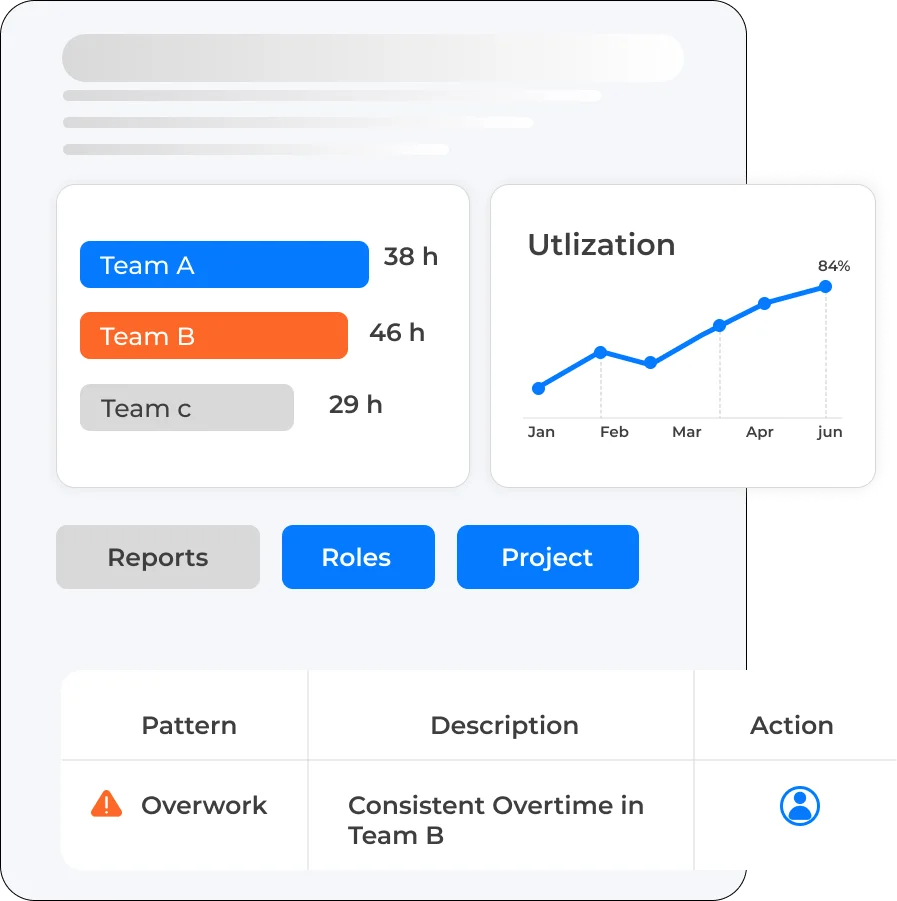
Reports on how time is spent across teams and projects
Insights

Understand Work Hours

Don't just track time — use it to improve how your team works.

  • Don't just track time; you can use it to improve how your team works
  • Reports showing exactly how time is spent within a team, role, or project
  • Prevent bottlenecks before they have an impact on your timeline
  • Using accurate data, not assumptions for planning
See It In Action
Every Work Style

For All Teams

Whether your teams are in the office, remote, or in the field, timesheets adapt to how they actually work.
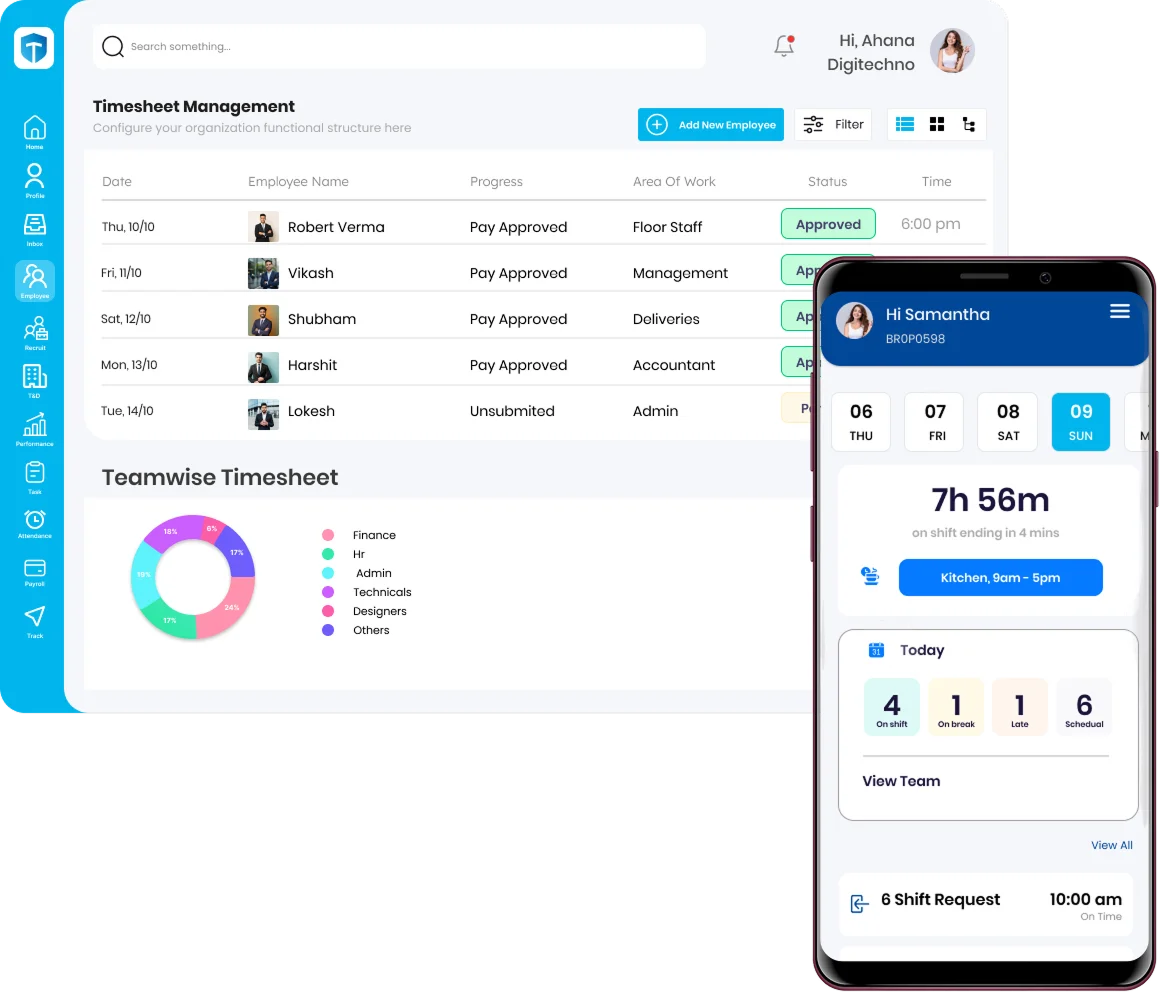
  • Works equally well for in-person, remote, hybrid, and mobile workers
  • Geo-fencing check-ins verify the location of mobile workers
  • Offline data syncing occurs automatically when reconnected to the internet
  • Independent of any particular device or location
Book a Demo
Timesheet software working for on-site, remote, and field teams
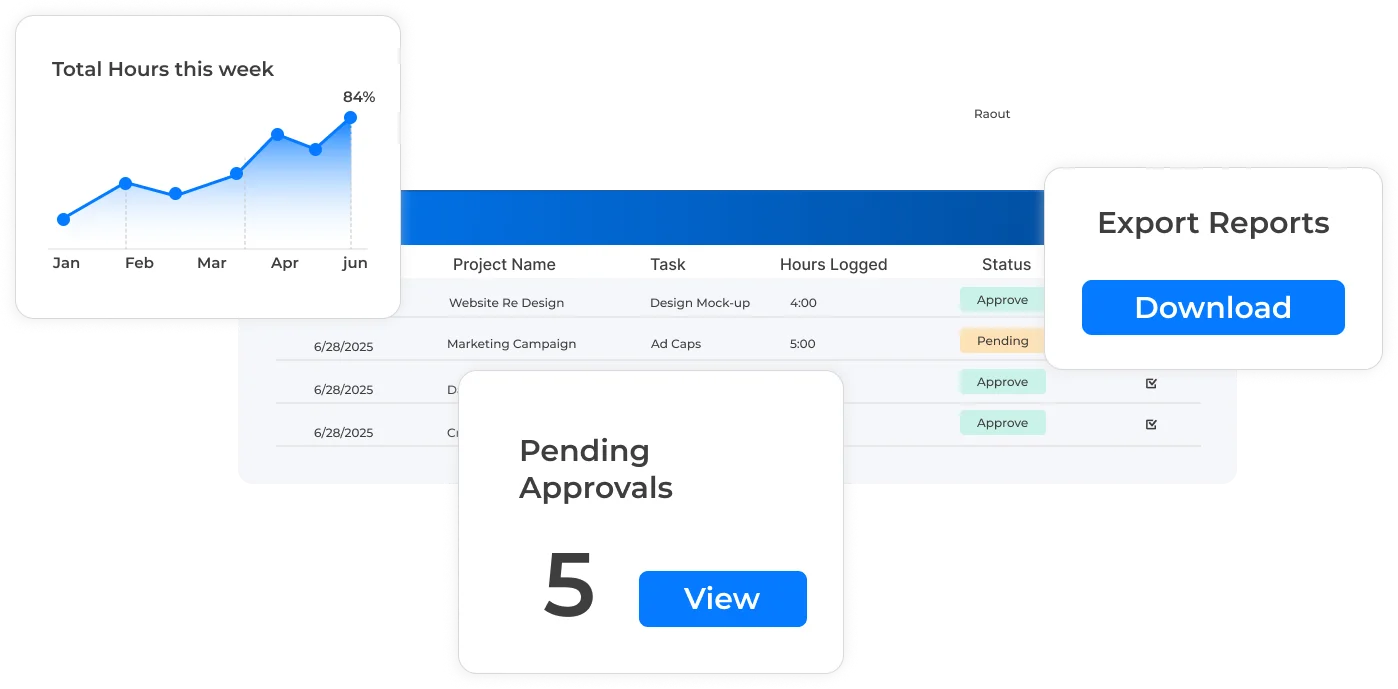
Approved timesheet hours flowing directly into payroll
The TankhaPay Difference

From Time to Payroll

Convert time sheets to accurate automatic payroll data.

  • Authorized hours worked will be automatically used in payroll processing
  • Eliminate problems of correlating hours worked with wages paid and overtime
  • Bill clients for time or calculate project costs based on the recorded time
  • Stay audit-ready with transparent records of time and approvals
See It In Action
Built for Complex Organisations

Built for How Large Teams Actually Track Time

Finance needs numbers that reconcile with payroll. Project leads need visibility into where hours actually go. TankhaPay serves both from the same log.

For Finance & Payroll Teams

  • Hours approved go straight into the payroll system without any additional data entry
  • Audit trail on times, approvals, and payments
  • Built-in overtime calculations and wage regulations
  • Client billing generated directly from recorded time
Talk to Sales

For Project & Team Leads

  • Real-time visibility into hours logged across projects
  • Spot overwork or underutilisation before it becomes a problem
  • Approve or flag entries with a single click
  • Geofenced accuracy for field and multi-location teams
Get Started
How It Works

From Clock-In to Payslip, in One Flow

1

Clock In

Geofenced, location-verified, works offline too.

2

Tag the Work

Link hours to a task, project, or client.

3

Manager Approves

Review and approve with a single click.

4

Synced to Payroll

Approved hours flow straight into salary runs.

Why TankhaPay

Why Not Just Track Hours on a Spreadsheet?

A spreadsheet can hold last week's hours. It can't confirm where someone actually clocked in from.

 Spreadsheets & Manual LogsTankhaPay
Location accuracySelf-reported, unverified✓ Geofenced check-in
Payroll syncManually re-entered✓ Automatic, same platform
Offline workLogged late or forgotten✓ Offline logging, auto-synced
Project visibilityHours logged, context lost✓ Tagged to task and project
Dispute resolutionNo clean record to check✓ Full approval history
HR Insights

Learn More About Time Tracking

Practical guidance for HR and project teams tracking time accurately in 2026.

In the Office

Clock in from a desk, no different from any other tracked entry.

Remote

Log hours from home, synced the same as an in-office entry.

On the Go

Field visits, client sites, or travel, tracked without missing a beat.

Trusted by 1,000+ Businesses

Track Time Easily

Simplify time tracking for all employees with no extra effort. Employees can easily log hours using TankhaPay, whether they're in the office, remote, or on the go. The user-friendly interface allows precise recording of work, breaks, and shifts without chasing spreadsheets. All entries stay organised and available in one location, giving managers immediate visibility for speedier approvals and smoother payroll.

FAQs

Questions Before You Book a Demo

What is a timesheet and why is it important?
A timesheet is the document that shows the number of hours an employee spends at work on a daily, weekly, or monthly basis. It can be used by companies for performance management and payroll calculation.
How does digital timesheet software work?
Timesheet software provides employees with the ability to enter their working hours in an online way or through mobile devices. It automatically monitors hours, overtime, and project allocation.
Can timesheets accommodate flexible work schedules?
Yes. Modern timesheet tools support flexible hours, remote work, and hybrid schedules, allowing employees to record work even if they are offsite or working irregular shifts.
What are the key features of a timesheet system?
Features that are common include check-in and check-out recording, break scheduling, shift planning, project-based time recording, reports and dashboard generation, and approval flows.
How do timesheets integrate with payroll and HR systems?
Information from timesheets may be synchronized with payroll and human resource systems for accurate wage calculation and overtime pay.
Can timesheets track multiple projects or tasks simultaneously?
Yes. Employees will be able to log hours for varied projects, tasks, or clients, which would help managers keep track of efficiency and distribute resources accordingly.
How does a timesheet system support compliance?
Timesheets are an accurate way to record work hours, break hours, and overtime hours, thus ensuring compliance with labor laws and wage laws.
What is geo-fencing and how is it used in timesheets?
The geo-fencing feature makes sure that the employees clock in and out only at the authorized places.
Can timesheets prevent discrepancies if an employee is offline or loses internet connection?
In today’s timesheets, users can log even when they are offline. The hours worked offline will be synced as soon as the connection is back on.
How can managers use timesheets for reporting and decision-making?
Information gleaned from timesheets gives an indication of how productive employees are, the status of projects, overtime issues, and proper allocation of resources.

Still have questions? Call 989-198-8811 →

Page last updated: 28 July 2026

Talk to Us

Track Time, Drive Productivity

Convert time tracking into valuable information that enhances productivity, payroll efficiency, and smarter working teams.

TankhaPay by AKAL

HRMS  •  Payroll  •  Attendance  •  Compliance

+91 989-198-8811 sales@tankhapay.com

Submit your enquiry

We respond within 24 hours.

1,000+ businesses already trust TankhaPay

Every Hour, Accounted For

From clock-in to payslip, without a single spreadsheet or manual reconciliation.

Book a Demo → 📞 989-198-8811
✓ No commitment required ✓ Free 30-min consultation ✓ Response within 24 hours