Get a Demo
Ask + Track + Resolve, One System

Help & Support That Works as Hard as You Do

Every HR, payroll, or compliance concern needs an immediate and traceable solution. The built-in Help and Support center in TankhaPay allows employees to make their queries and follow them throughout the process rather than trying to chase HR by e-mail.


1,000+ Companies
ISO 27001
CMMI Level 5
24/7 Self-Service
Ticket LifecycleFrom query to resolution
Live
Ticket RaisedLogged and categorised instantly
Done
Assigned to HRRouted to the right specialist
Done
In ProgressPriority set, SLA tracked
Active
Status UpdatedEmployee notified automatically
Done
Resolved & LoggedFull history kept for reference
Done
Trusted across India's leading organisations
Quick Definition

What Is an HR Help Desk?

A help desk for HR is a forum where all questions regarding HR, payroll, attendance, leaves, or policies are raised by the employees. The question is tracked until it is answered to its logical conclusion. The help desk of TankhaPay ensures that all questions asked are recorded in the form of tickets.

Queries Lost in Inboxes

Queries are asked by employees in emails, WhatsApp messages, and through hallway chats without tracking.

✓ Every query logged as a ticket

No Visibility Into Status

Employees unsure whether anybody has taken notice of the question.

✓ Real-time status, every step

No Accountability

No record of who was assigned a query or how long it actually took to resolve.

✓ Assigned, timed, and tracked

HR Buried in Repeat Questions

The same questions asked over and over, with no searchable history to point back to.

✓ Searchable ticket history
See How TankhaPay Fixes This
Key Features

Everything Your Help Desk Needs to Actually Work

From the first question to a searchable resolution history.

Smart Assignment

Tickets routed to the right HR specialist, with priority levels for urgent cases.

Real-Time Status Updates

Open, in process, pending, or closed status at all times is known to the employee who raised the ticket.

Defined SLAs

Resolution timelines are set and tracked, so accountability isn't left to memory.

Role-Based Access

Queries and responses stored securely, with access limited to who needs it.

Query Trend Visibility

See what employees are actually asking about to plan HR resourcing better.

Desktop & Mobile Access

Raise tickets, check status, and browse FAQs from anywhere.

Book a Demo
The TankhaPay Difference

Support That Already Knows the Answer

Most help desks are a black box disconnected from actual HR data. TankhaPay's isn't — because support runs on the same platform as payroll and attendance, HR agents see the relevant employee record the moment a ticket comes in, instead of asking the employee to re-explain their situation from scratch.

  • Payroll and attendance information is readily available in front of the ticket itself.
  • Less clarification is required for the query before it begins.
  • Single record of each employee and no separate support database.
See It In Action

Payroll Record

Salary, deductions, and payment history visible the moment a ticket opens.

Attendance Record

Recent check-ins, leave, and hours, right alongside the query.

Support Ticket

One thread, one employee record, nothing to re-explain.
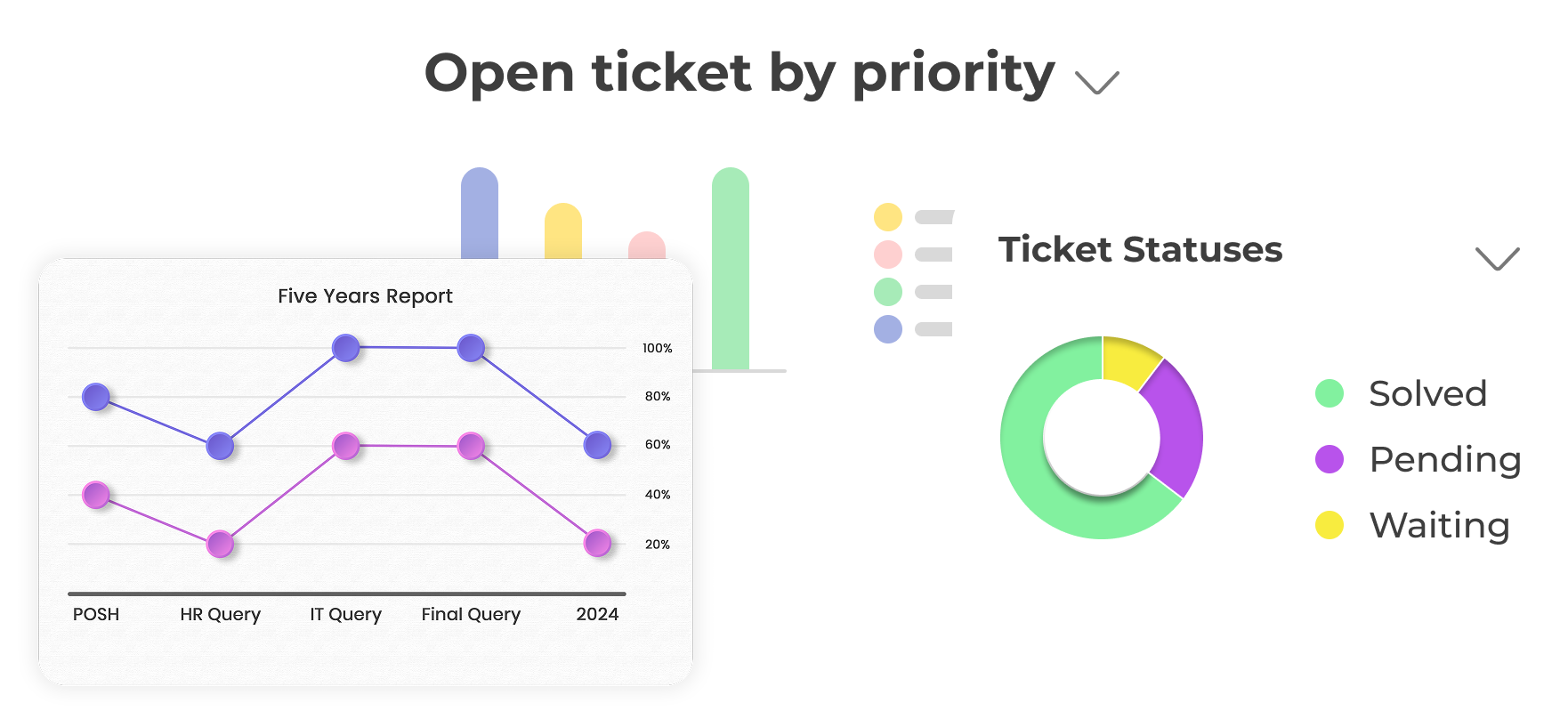
Ticket analytics showing open tickets by priority and ticket statuses
At a Glance

Support That Fits Your Team

A single, centralised system for questions, status tracking, and resolution, with a clear picture of where every ticket actually stands.

  • Open tickets sorted by priority, at a glance
  • Solved, pending, and waiting statuses tracked in one view
  • No digging through email threads to find what's outstanding
Book a Demo
Categorisation

Track and Manage Every Request

Every category comes with its own turnaround time, department, and owner, so nothing sits without someone accountable for it.
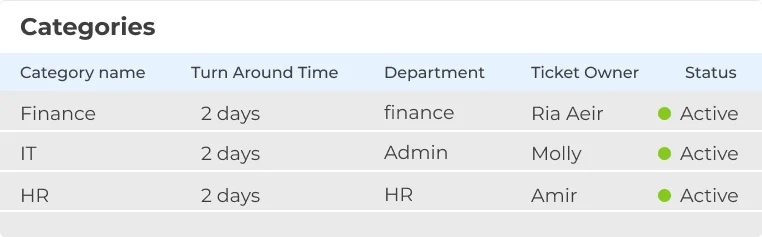
  • Finance, IT, HR, and any other category, defined once
  • Turnaround time set per category, not guessed at
  • Every ticket has a named owner and a live status
See It In Action
Ticket categories table with turnaround time, department, and owner
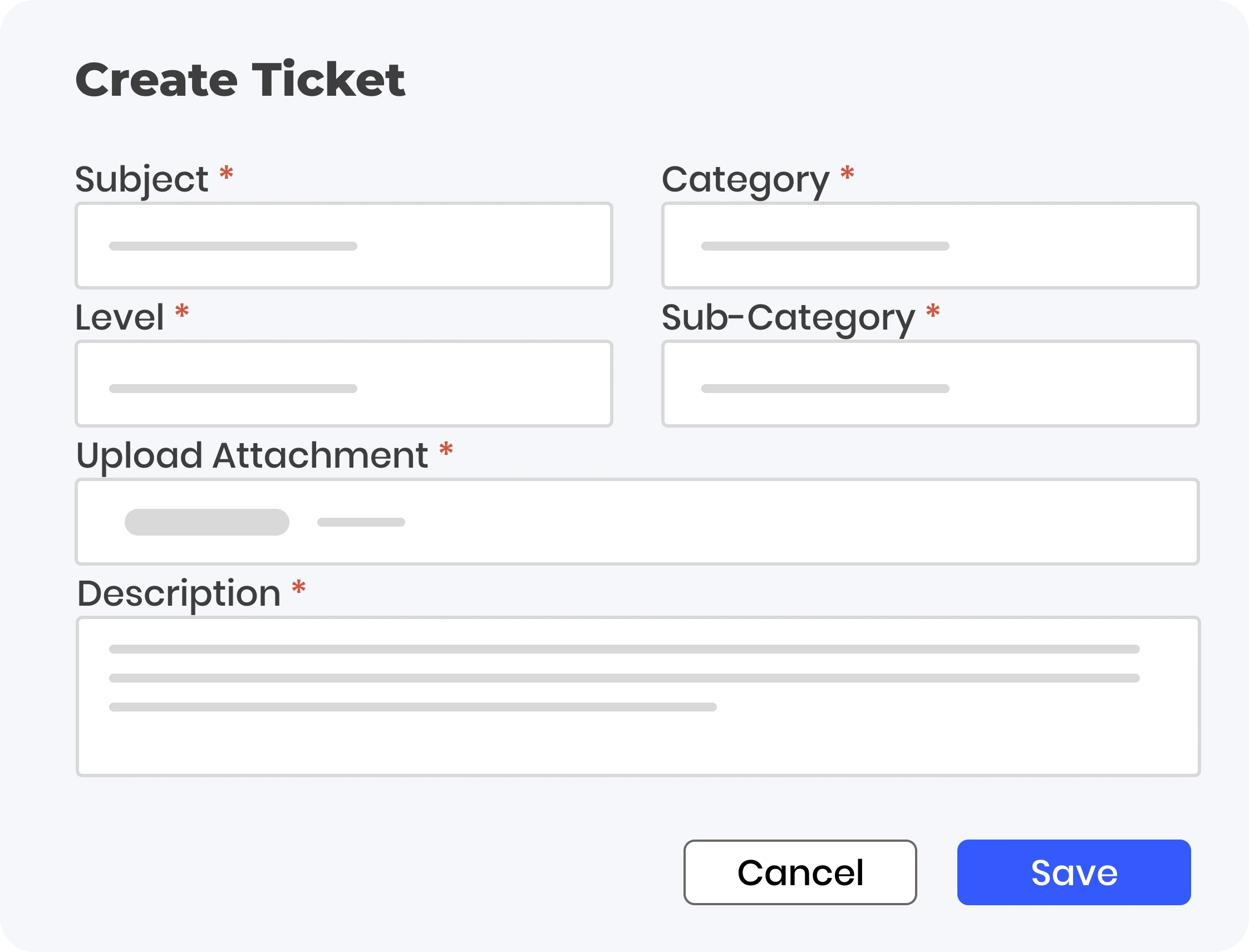
Create ticket form with subject, category, level, and description fields
Ticket Creation

Raise a Ticket in Seconds

A simple form is all it takes, subject, category, sub-category, and a description, with attachments if the issue needs more context.

  • Category and sub-category route the ticket automatically
  • Attach a screenshot or document without leaving the form
  • No training required, employees fill it out once and it's clear
Book a Demo
Built for Complex Organisations

Built for How Large HR Teams Actually Handle Support

HR leadership needs to see the trends. Individual HR reps need to close tickets fast. TankhaPay serves both from the same queue.

For HR Leadership

  • Trends analysis of queries in different departments and offices
  • Visibility of SLA compliance for the entire support team
  • Ticket history for auditing purposes
  • Role-based access for confidentiality of sensitive queries
Talk to Sales

For HR Support Teams

  • Tickets categorized according to their category and priority.
  • Contextual information about employee payroll and attendance information is readily available within one tool.
  • Assigned properly so no tickets fall through the cracks.
  • History is searchable for repeated queries.
Get Started
How It Works

From Question to Resolved, in One Flow

1

Employee Raises a Ticket

From desktop, mobile, or self-service portal.

2

Auto-Categorised

All tickets are entered and sorted according to category or department automatically.

3

Tracked to Resolution

Status visible in real time, SLA tracked throughout.

4

Logged for Reference

Full history kept, searchable for next time.

Why TankhaPay

Why Not Just Handle HR Queries Over Email?

An inbox can receive a question. It can't tell you how long it's actually been sitting there.

 Email & WhatsAppTankhaPay
Query trackingBuried in inboxes, easy to lose✓ Logged as a trackable ticket
Status visibilityEmployee has to ask again✓ Real-time, self-serve
AssignmentWhoever happens to see it first✓ Routed to the right specialist
Employee contextRe-explained every time✓ Visible alongside the ticket
HistoryScattered across threads✓ One searchable record
HR Insights

Learn More About HR Support & Self-Service

Practical guidance for HR teams reducing query load and response times in 2026.

FAQs

Questions Before You Book a Demo

What is an HR Help Desk and why is it important?
An HR Help Desk is a central platform where employees may ask questions about HR, payroll, attendance, leave, and rules. It provides quick answers, minimizes HR workload, and keeps track of all employee requests.
How does an HRMS Help Desk improve employee experience?
With helpdesk tickets, self-help capabilities, and live assistance, workers can receive answers to their questions quickly without having to rely on human resource management.
Can HR Help Desk handle multiple types of queries?
Yes, HR Help Desks of today are able to take care of attendance, payroll questions, leave policies, clarifications of HR policies, and compliance all at once.
How are tickets tracked and managed in the Help Desk?
The queries received will receive tickets, each with its unique ID number. This helps HR to monitor how well the tickets are being processed, assigns responsibility, prioritizes the matter, and assists in solving the issue effectively.
Can HR teams define SLAs for resolving employee queries?
Yes. Resolution timelines can be defined per query type, so tickets don't sit indefinitely and HR stays accountable for how quickly issues actually get resolved.
Is employee query data kept secure and confidential?
Yes. All queries and responses are securely stored in the TankhaPay cloud, with role-based access controls limiting who can view sensitive tickets and responses.
Can HR see trends in the types of queries employees raise?
Yes. Trends for queries are known to HR managers. They can make plans based on the trends observed.
Is the HR Help Desk accessible via mobile or self-service portals?
Yes. The support system can be accessed via mobile phones or through self-service portals.

Still have questions? Call 989-198-8811 →

Page last updated: 28 July 2026

Talk to Us

Support That Always Has Your Back

We make communication easy and help you build a workplace where people feel heard, valued, and informed.

TankhaPay by AKAL

HRMS  •  Payroll  •  Attendance  •  Compliance

+91 989-198-8811 sales@tankhapay.com

Submit your enquiry

We respond within 24 hours.

1,000+ businesses already trust TankhaPay

No Ticket Falls Through the Cracks

A smarter way to listen and support, helping your team feel heard, valued, and informed, every time they ask.

Book a Demo → 📞 989-198-8811
✓ No commitment required ✓ Free 30-min consultation ✓ Response within 24 hours