The most important payroll software features are: automated salary calculation, statutory compliance (PF, ESIC, TDS, PT), tax filing automation, employee self-service, attendance integration, audit trail, multi-state payroll, and real-time analytics. For Indian businesses, compliance automation and biometric integration are non-negotiable. Everything else depends on your business size and complexity.
Key Takeaways
- India’s statutory compliance (PF, ESIC, PT, TDS, across 18 states, Labour Code 2025) requires features that generic global tools frequently miss.
- Biometric attendance integration saves 4 – 8 hours of manual reconciliation per payroll cycle in manufacturing and retail.
- Multi-state payroll capability is essential for any business with employees in more than one state – 18 states levy PT with different slabs and filing frequencies, and minimum wage notifications vary across all of them.
- AI-based error detection is now standard on leading platforms – it catches errors before disbursement, not after
- The most underrated payroll software feature is the audit trail – businesses only realise its value when a statutory notice arrives
- Evaluate payroll software against your actual compliance obligations, not the feature list in the demo
What is Payroll Software?
Payroll software is a system that automates the calculation, processing, and disbursement of employee salaries, alongside statutory deductions, tax filings, and compliance reports. It replaces manual payroll processing and spreadsheet-based salary computation with a system that applies current statutory rates, generates challans and returns, and maintains audit-ready records.
At its core, payroll software takes three inputs – employee master data, attendance, and compensation structure – and produces accurate payslips, bank transfers, and statutory filings without human calculation. The quality of the output depends on the quality and completeness of the features built into the system.
What are Payroll Software Features?
Payroll software features are the specific capabilities a payroll system offers to automate, comply, report, and integrate across the payroll function. Some features address calculation accuracy (shift differentials, multi-component CTC). Others address compliance (ESIC challan, TDS under both regimes). Others address workflow (maker-checker approval, payroll scheduling). And some address strategy (CFO dashboards, payroll forecasting).
Selecting payroll software through a features checklist on the basis of a sales brochure is quite distinct from selecting one on the basis of your compliance needs and the complexity of your work force.
Why Payroll Software Features Matter
The proper payroll features accomplish all five things at once, which is not possible for manual payroll systems.
Compliance: PF, ESIC, TDS, PT, LWF, Bonus Act, Labour Code 2025 – each with their own formula for computation, deadline for filing, and penalties for non-compliance. An incorrectly set-up feature equals non-compliance problem that grows each month.
Time savings: Payroll processing manually for 200 employees takes 3–5 days every month. Good payroll software with biometric and attendance synchronization with automatic computation does it within 4 hours.
Error reduction. Payroll errors are the most cited reason employees lose trust in their employer. PayrollOrg (formerly the American Payroll Association) estimates that manual payroll has a 1–8% error rate. Automated systems with pre-run anomaly detection push that below 0.5%.
Employees’ experience. The employees who can view payslips, Form 16, declarations on investments, and the status of leaves without filing any HR ticket tend to give higher satisfaction scores. Self-service functionality eliminates friction in the employee’s experience.
Scalability. A business that adds 200 people in a year cannot hire 200% more payroll staff. The right payroll software features scale with headcount automatically – adding states, adding worker types, adding entities – without adding manual overhead.
25 Must Have Payroll Software Features
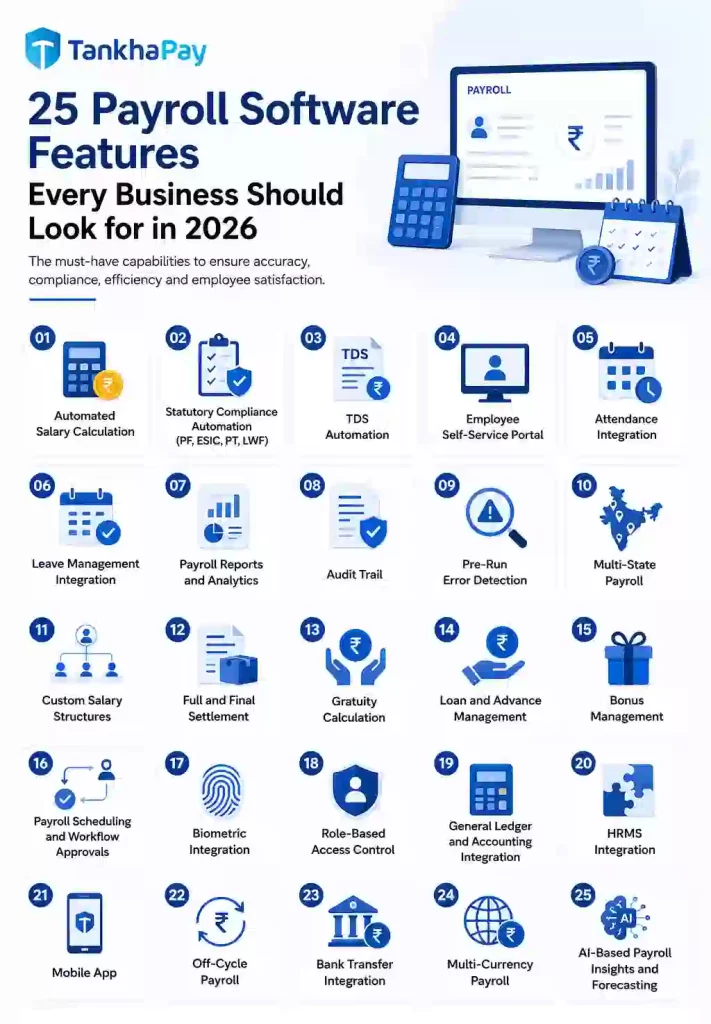
1. Automated Salary Calculation
What it is: Gross salary is generated by taking into account the attendance details, leaves taken, and pay structure information without any manual interference. This is done using the CTC structure and making deductions and additions depending upon the rule set up in advance for each individual.
Why it matters: For calculating salaries of 500 people manually, you will need to calculate separately for each individual. One mistake in one formula in a common spreadsheet will cause mistakes for all the individuals sharing the same structure.
Benefits:
- Eliminates any mathematical mistake
- Automatically performs calculations on multi-components CTC (basic, HRA, LTA, special allowances, variable pay)
- Appropriately calculates arrears, pay increments, mid-month joiners/leavers
Example: A factory employing 800 people working on day shift, night shift, and double shift – where everyone has their own basic and OT rate – performs calculations of gross pay of all in less than 60 seconds using automation.
Best for: Every business from 5 employees upward.
Buying Tip: Ask the vendor to demonstrate a mid-month joining (15th of the month) and a salary revision (effective from the 1st of a prior month). Both are common scenarios that expose weak calculation engines.
Key Takeaway: Automated salary calculation is the foundation every other feature builds on – get this wrong and everything downstream is wrong.
2. Statutory Compliance Automation (PF, ESIC, PT, LWF)
What it is: The system automatically computes and generates challans, ECR files, and returns for all Indian statutory obligations – Employees’ Provident Fund; ESIC; Professional Tax across the 18 states that levy it; and Labour Welfare Fund where applicable.
Why it matters: A single-day delay in filing PF challan results in an interest rate of 12 percent per annum under Section 7Q, besides penalty rates under Section 14B, which is flat at 1 percent per month from June 2024, theoretically capping up to 100% of dues for defaulters who have not paid for more than eight years. If one misses filing the ESIC challan, penalties would apply. PT will differ from state to state, slabs, and periods of filing. There are 18 variations in total.
Benefits:
- ECR generated for EPFO portal
- ESIC calculations done at relevant rate for employers (3.25%) and employees (0.75%)
- Automatic updates to PT slab based on state changes in rates
- Challan history maintained for statutory record
Example: For a logistics firm with employees from Karnataka (PT of ₹200/month above a certain slab), Maharashtra (₹2,500/year) and Tamil Nadu (up to ₹2,500/year but deducted semi-annually depending on the corporation), the PT differs per employee belonging to each state – all done automatically.
Best for: Any company employing multiple employees – PF requirements begin right at your first hire.
Buying Tip: Inquire about updates from Labour Code 2025 that have been integrated into the program. There is a 50% basic salary clause introduced in PF calculation for low-basic-CTC companies. If the system can’t address this particular update, it’s outdated.
Key Takeaway: Statutory compliance automation is not optional – it is the feature that keeps your business out of penalty notices.
3. TDS Automation
What it is: The system calculates monthly TDS deduction under Section 192 for every employee based on their declared tax regime (old or new), projected annual income, and investment proof submissions. It generates Form 24Q quarterly and Form 130 (which replaces Form 16 under the Income Tax Act 2025) by June 15 each year.
Why it matters: An incorrect TDS deduction is a double liability, the employer faces Section 201 liability for a short deduction while the employee faces a tax demand at year-end. For employees earning above ₹10 lakh, the difference between the old and new regime TDS can exceed ₹1 lakh annually.
Benefits:
- Manages both the old and new tax regime of an employee at the same time
- Automatically recalculates TDS in case of submission of investment proofs by employees during the year (usually Q3)
- Produces the correct form 130 with surcharge for high income earning employees
Example: A 300-employee IT company wherein 180 employees opt for the new regime and 120 employees opt for the old regime; then TDS Automation calculates TDS correctly for all 300 employees at once without using a spreadsheet manually.
Best for: Every business with salaried employees. Non-negotiable.
Buying Tip: Verify that the platform generates Form 130 (not just Form 16) and handles mid-year regime change correctly. Many platforms updated their Form 16 template but have not truly rebuilt the calculation for Form 130 under the new Income Tax Act 2025.
Key Takeaway: TDS automation that covers both TDS and Form 130 is the bare minimum to look out for in any payroll software platform.
4. Employee Self-Service Portal
What it is: A digital interface which is accessible both online and on mobile apps, where employees can access their payslips, tax information, leave balance, investment declarations, reimbursement claims, and salary structure without approaching HR.
Why it matters: HR teams in medium businesses spend 30–40% of their time answering payroll-related employee queries: “When is my salary coming?” “Where is my Form 16?” “Why is my TDS this month?” Self-service eliminates this category of work.
Benefits:
- Investment certificates filled by the employee in digital format; no paperwork needed
- Salary slip available instantly upon calculation of the salary
- Reimbursement request along with digital receipt
- Letter regarding salary revision and offer letter available for the past
Best for: Any company with more than 20 employees. For less than 20, HR department can respond to questions directly; above 20, it adds up to be an important time drain.
Buying Tip: Test the mobile app yourself on a basic Android device. If the interface requires desktop-class navigation or loads slowly on a 4G connection, shop-floor workers and field staff will not adopt it, and the self-service benefit is lost.
Key Takeaway: Employee self-service reduces HR administrative burden by 30–50% and eliminates the most common source of employee-HR friction.
5. Attendance Integration
What it is: The payroll system connects directly to attendance data sources, biometric devices, HRMS attendance modules, time-tracking tools, or manual registers and applies attendance data (present days, late arrivals, half-days, and overtime) to salary computation without manual data transfer.
Why it matters: In organizations that lack attendance integration, payroll personnel take 1-3 days to collect, clean, and format attendance data in preparation for calculations. Manually transferring the data also results in errors at the most critical stage.
Benefits:
- Attendance data from biometric hardware (Essl, ZKTeco, Realtime, Mantra) automatically transferred to payroll
- LOP (Loss of Pay) automatically calculated from absent days
- Overtime calculation from actual punches per shift type
Best for: Manufacturing (biometric systems at gates), retail (multi-store attendance), logistics (field attendance via GPS check-in).
Buying Tip: Ask for a list of biometric device models the system supports. “Integrates with biometric devices” can mean anything from a manual CSV import to a real-time API connection. The difference in practice is 4 hours of manual work per cycle.
Key Takeaway: Integration in attendance reduces the manual intervention in the payroll process by eliminating the initial data-gathering stage before any calculation takes place.
6. Leave Management Integration
What it is: The payroll system is linked with the leave management module to gather the approved leave information to perform calculations for leave deductions and encashment of earned leave.
Why it matters: Leave and payroll are the two functions most likely to generate employee disputes. If leave balances in the HRMS do not match what the payslip shows, the error falls on HR to explain and rectify – often requiring salary revision in the following month.
Benefits:
- Actual LOP calculation based on leave records approved
- Accurate earned leave encashment calculations in F&F cycles
- Correct application of comp-off based on overtime records
Buying Tip: See if the system has a workflow for leave approvals that will automatically update payroll calculations without HR having to export/import leave details each time they run payroll. This is what true integration looks like.
Key Takeaway: Integrated Leave Management fills the difference between the actual salary earned by the employees and the recorded leave data, thus minimizing one of the major sources of payroll disputes.
7. Payroll Reports and Analytics
What it is: This process produces standard reports such as salary register, bank transfer list, PT report, PF statement, ESIC statement and analytics reports such as department wise salary cost, headcount trends and statutory liabilities forecast.
Why it matters: If a CFO needs payroll cost per department for his board meeting and is told that it will take him 3 days to get the data from the payroll folks who have to export spreadsheets, then he doesn’t need to waste time.
Benefits:
- Bank transfer list exported in your bank format
- Statutory reports for compliance filings
- Salary allocation at cost centre level for management accounting
- Year-over-year payroll growth analysis
Ideal for: Any company that prepares monthly MIS. Crucial from the Series A stage itself.
Best for: Any business preparing monthly MIS. Critical from the Series A startup stage onwards.
Buying Tip: Ask for a live demo of the CFO dashboard. If the vendor shows you a static screenshot, the analytics capability is likely limited. Real-time dashboards update within 24 hours of every payroll run without export-import steps.
Key Takeaway: Payroll analysis which requires the user to export information to an Excel sheet is not an analysis but rather unfiltered data located elsewhere.
8. Audit Trail
What it is: An immutable, timestamped record of every action taken within the payroll system, who changed what, when, and from what previous value. Every payroll run, salary revision, PF update, and configuration change is logged and cannot be altered retroactively.
Why it matters: It is an unchangeable log showing the history of each transaction performed in the payroll process, who made the changes and when as well as what previous value was changed to a new one.
Benefits:
- The maker/checker trail identifies who has approved each payroll run
- Salary modification history identifies when the modifications have been made
- Documentation of statutory filings is evidence during audits
Best for: Every business. Audit risk increases with headcount, but the need for an audit trail starts from the first statutory filing.
Buying Tip: Ask whether the audit trail is truly immutable. Can an admin user delete or edit historical entries? The answer must be no. Some platforms call a deletion log an “audit trail”; these are not equivalent.
Key Takeaway: An audit trail is the documentary proof that protects you when any statutory authority questions your payroll records. Do not buy payroll software without one.
9. Pre-Run Error Detection
What it is: Prior to the running of the payroll, the system checks for any inconsistencies in the input data, salaries that differ greatly from previous months, workers with no attendance, discrepancies in the tax deductions from previous cycles, errors in the structure of the investments reported, and lack of bank information.
Why it matters: Making mistakes once 2,000 salary payments have been made to workers can be both operational and reputational problems. Reversing the money needs interaction with banks, informing employees, and deduction of money in the next cycle. The pre-run check enables rectification through configuring.
Benefits:
- Detects salary anomaly prior to payout
- Detects missing information (attendances and unlinked accounts) which will cause failure
- Eliminates post-payroll correction loop
Buying Tip: Enquire from the vendor how the software behaves in case there is a salary value that is 300% more than the previous month’s salary value. Does it alert or process silently? If it alerts, it’s an error detection; otherwise, it’s a deficiency.
Key Takeaway: A payroll error caught before disbursement costs one hour of configuration time; the same error caught after disbursement costs three days of damage control.
10. Multi-State Payroll
What it is: The system manages payroll for employees across multiple Indian states simultaneously, applying the correct Professional Tax slab, minimum wage rate, Labour Welfare Fund contribution, and filing frequency for each state – per employee based on their work location.
Why it matters: There are 18 states which impose PT, all having different slab structures and filing requirements. In Karnataka, it is charged monthly (upto ₹200/month), while in Maharashtra, it is levied on an annual basis (₹2,500/year). While there are unique slab structures in both Tamil Nadu and Gujarat. A firm operating in 5 states which charge PT will have five different structures to comply with.
Benefits:
- Auto-updated PT slab based on changes made by the government of states
- PT levied on each worker according to his state of work and not the state where the company headquarters is located.
- State-wise compliance calendar with alerts of deadlines
- LWF can be set up according to the rules of the particular state.
Best for: Any company having offices/warehouses/staff working in different states. Essential for logistics, manufacturing, retail, and IT service firms.
Buying Tip: Request a live demonstration for Karnataka, Maharashtra, and Telangana, all in one payroll processing. Confirm whether the deduction of PT has been calculated at the right percentage applicable to each state. In case of any reluctance in doing so, it indicates inadequate coverage.
Key Takeaway: Multi-state payroll is not a premium feature; it is a compliance requirement for any business with employees in more than one state.
11. Custom Salary Structures
What it is: The system allows HR teams to configure multiple salary templates with different component combinations (basic, HRA, LTA, special allowance, uniform allowance, transport allowance, and food coupons) for different employee grades, departments, or employment types.
Why it matters: In a manufacturing company, there will be a difference in the salary structure of shop-floor laborers, supervisors, and managerial people. In a technology company, the salary structure of a junior engineer is different from that of a senior architect. It will either lead to a wrong calculation of PF or a workaround manually.
Benefits:
- Different structures for permanent, contract, and trainee employees
- Flexibility to add custom allowances (shift allowance, risk allowance, night duty) per category
- Correct PF computation based on actual basic salary per structure
Best for: Any business which has more than one grade or category of employee.
Buying Tip: Ask the vendor how many custom salary components the system supports and whether there is a limit. Some platforms cap at 10–15 components, which is insufficient for manufacturing or healthcare with complex allowance structures.
Key Takeaway: Custom salary schemes form the basis of calculating PF, TDS, and bonuses correctly.
12. Full and Final Settlement
What it is: When an employee exits from his/her service, the system automatically calculates the total amount of F&F payment, which includes payment of salary, earned leave encashment, gratuity (in case of eligibility), notice period recovery/payment, reimbursement pending amount, and also loan recovery (if any).
Why it matters: The Labor Code stipulates that full and final settlement needs to be done fully and finally within 2 days of an employee’s last day. Businesses in industries with high attrition rates (e-commerce 25-29%, BPO 30-35%) do multiple F&F settlements in a month. Manually calculating F&F for each leaving employee is a time-consuming process that can result in errors in gratuity calculation.
Benefits:
- F&F computed automatically from employee records with no manual calculation
- Gratuity eligibility verified against service period under Social Security Code
- TDS on F&F components computed separately from monthly payroll TDS
- Final payslip generated immediately on processing
Best for: Every business, but critical for high-attrition industries.
Buying Tip: Test F&F for an employee who has worked for exactly 4 years 240 days (just under the traditional 5-year gratuity threshold) to see if the system handles the new Social Security Code eligibility rules correctly.
Key Takeaway: F&F settlement automation ensures Labour Code 2025 compliance and protects against the most common trigger for post-employment disputes.
13. Gratuity Calculation
What it is: The system calculates gratuity entitlement per the Payment of Gratuity Act (1972) and Social Security Code (2020) – 15 days of wages for every completed year of service, based on the last drawn wage. It maintains monthly gratuity provisioning for accounting purposes.
Why it matters: Gratuity computation errors are one of the most common causes of post-separation disputes and labour court cases in India. The calculation basis (what counts as “wages” under the new Social Security Code), eligibility period, and maximum ceiling are all different under the 2020 Code than under the original Act.
Benefits:
- Monthly gratuity provision tracked in the system for accrual accounting
- Gratuity computed at F&F using correct definition of wages per Social Security Code
- Eligibility correctly verified, including partial year service in certain conditions
Buying Tip: Enquire if the gratuity is based on the Payment of Gratuity Act 1972 or the Social Security Code 2020. The difference between them lies in the determination of the terms “wages” and “eligibility”. If you receive a vague reply from the seller, the calculation could be obsolete.
Key Takeaway: The gratuity should be calculated in accordance with the appropriate statute. Otherwise, it goes straight to the labour court.
14. Loan and Advance Management
What it is: The system manages employee salary advance and loan information, automates EMI deduction from salary, keeps track of balance, and ensures proper tax deduction on interest-free loan amounts exceeding ₹20,000 (which is a perquisite as per Section 17(2)).
Why it matters: If salary advances are managed using spreadsheets, then there would be chances of erroneous recoveries, inaccurate balance and no deduction of tax. In case employees quit while having outstanding loan balances, the system will help determine the amount to be recovered from F&F.
Benefits:
- Different loan options created (personal advance, festival advance, education loan)
- EMI auto-deduction from monthly salary
- Outstanding amount viewable by employee in self-service module
- Correct valuation of perquisite for interest-free loans to calculate TDS
Buying Tip: Check if the system supports closing of loan ahead of time and restructure loan (change EMI amount during tenure) without any intervention from payroll team.
Key Takeaway: Loan management integrated into payroll prevents the most common discrepancy between HR records and payroll deduction history.
15. Bonus Management
What it is: This system helps calculate and process performance bonuses, festival bonuses, incentive payments, and statutory bonus under the Payment of Bonus Act, which includes the calculation of allocable surplus and the ceiling amount of the statutory bonus at 20% per employee.
Why it matters: Any mistakes in processing the mid-year performance bonus will impact the whole financial year’s computation of TDS. The calculation of the statutory bonus (especially ceiling wage and allocable surplus calculation) poses audit risks.
Benefits:
- Statutory bonus calculated using proper methodology of allocable surplus
- Performance bonus processed as off cycle payroll using proper TDS calculation
- Bonus payment history recorded by each individual for Form 130
Buying Tip: Enquire how the software recalculates TDS in case of processing a large bonus in Q3 as the estimated annual income has undergone drastic change, requiring TDS re-calculation.
Key Takeaway: Bonus management requires TDS recomputation, it is not simply adding a salary component and paying out.
16. Payroll Scheduling and Workflow Approvals
What it is: It allows the payroll managers to schedule payroll run cycles (usually once a month on a certain day) and to set up approval workflows (payroll input validation by one person and approval by another).
Why it matters: Payroll without a workflow approval structure is a segregation-of-duties control failure. The person who inputs salary data should not be the same person who approves disbursement – this is a fundamental internal control required by most statutory auditors and increasingly by RBI-regulated entities.
Benefits:
- Maker-checker process to avoid one-sided salary increments/decrements
- Schedule payroll processing to avoid last-minute panic and mistakes
- Audit-proof trails of approvals maintained for auditors
- Reminders avoid missed deadlines
Best for: Companies that are statutorily required to get their accounts audited (BFSI, listed firms, government contracts).
Key Takeaway: A payroll approval workflow is an internal control requirement and not a luxury . The lack of one is an audit deficiency.
17. Biometric Integration
What it is: The system integrates seamlessly with the biometric attendance systems (fingerprint, facial recognition, and RFID for access) and pulls punch data either in real-time or through scheduled synchronization, thus getting rid of any manual management of the attendance registers.
Why it matters: For manufacturing, construction, retail, and healthcare businesses with existing biometric devices in place, the issue is not how to utilize the attendance data but rather if this data is transferred to payroll processing automatically or manually, introducing errors in the process.
Benefits:
- Facilitates integration with large Indian biometric providers (Essl, ZKTeco, Realtime, Mantra, Matrix)
- Data collection across multiple devices in different locations
- Shift assignment based on device location for calculation of shift difference
- Collection of original punching data for dispute resolution
Buying Tip: Check whether the software integrates through a real-time API or using a CSV file every night. The CSV method every night is not true integration – it needs IT support to configure and fails when the format changes.
Key Takeaway: If your organisation already has biometric devices installed, real-time payroll integration eliminates the most error-prone manual step in your entire payroll cycle.
18. Role-Based Access Control
What it is: The system restricts what each user can view, edit, approve, or export based on their defined role. A payroll executive sees salary data for their assigned employees; an HR manager sees all employees in their entity; a CFO sees aggregated cost reports; an employee sees only their own records.
Why it matters: It is one of the most sensitive personal data categories that a business has. Giving unlimited access to all users poses risks related to data security and DPDP Act 2023 non-compliance. Under the Digital Personal Data Protection Act, businesses are required to provide appropriate access control measures for sensitive personal data.
Benefits:
- Segregation of duties between payroll input, approval, and disbursement
- Geographic or entity-level access restriction for large organisations
- Employee access limited to own data only
- Full access log showing who viewed what and when
Buying Tip: Is the access control feature role-based (settable by role type) or user-based (settable per individual user)? Role-based is scalable, whereas user-based becomes unmanageable beyond 50 system users.
Key Takeaway: Role-based access control is mandatory from the perspective of security and compliance according to the DPDP Act 2023, not an optional premium feature.
19. General Ledger and Accounting Integration
What it is: The system generates accounting journal entries from each payroll run (gross salary debit, PF credit, TDS payable credit, net salary payable credit) and either pushes them directly to an accounting system (Tally, QuickBooks, SAP) or exports them in a format ready for import.
Why it matters: Manual rekeying of payroll figures into accounting software is a source of reconciliation errors. Finance teams frequently find payroll costs in the accounts differ from payroll reports because someone keyed in the wrong month or the wrong amount.
Benefits:
- Automated journal entry generation after each payroll run
- Cost-centre allocation for management accounting
- Tally-compatible voucher export format
- SAP and QuickBooks integration via API for large organisations
Best for: Any business with a formal accounting function, which is effectively any company with more than 10 employees.
Buying Tip: Ask whether the integration is push (payroll system sends data to accounting software automatically) or pull (accounting team must manually initiate a download). Push integration with configurable GL account mapping is the correct approach.
Key Takeaway: Payroll-accounting integration eliminates the most common reconciliation gap between the payroll function and the finance function.
20. HRMS Integration
What it is: The payroll system connects to the broader HRMS, pulling employee master data (joinings, exits, and grade changes), leave data, and performance data into payroll without re-entry, while pushing payroll outputs (payslips, salary register) back to HR records.
Why it matters: Businesses using separate HR and payroll systems spend significant time duplicating data entry, entering employee details in the HR system, then entering them again in the payroll system. Every duplicate entry is a potential discrepancy.
Benefits:
- New joiner details entered once in HRMS automatically populate payroll
- Resignation approvals in HRMS trigger F&F process in payroll
- Grade change or designation revision in HRMS reflects in payroll salary structure
- Unified employee record across HR and payroll
Buying Tip: When you are testing an HRMS system that offers payroll services in one package, it is important to see if the payroll system is integrated into the system itself and not an add-on service from a third party.
Key Takeaway: HRMS integration is most valuable when employee data changes frequently, which is true of any growing business.
21. Mobile App
What it is: It is an application created for iOS and Android that enables employees to see payslips, vacation balance, tax forms, and claim procedures, as well as enables managers to approve vacation time requests and view the attendance of the team via mobile devices.
Why it matters: For field staff, factory workers, delivery executives, and remote employees, a desktop payroll portal is inaccessible. If employees cannot check their payslip from their phone, the self-service benefit is limited to office-based staff only.
Benefits:
- Pay slips available on mobile after being processed
- Leaves raised and approved on mobile
- Notifications for credit salary, availability of Form 16 and declaration pending
- Investment proof upload using camera
Buying Tip: Test the mobile app on a mid-range Android device (not a flagship) on a 4G connection. If it loads slowly or requires large downloads, adoption by manufacturing and logistics workers will be poor.
Key Takeaway: A well-designed mobile app extends payroll self-service to every employee, not just those with desktop access.
22. Off-Cycle Payroll
What it is: The system processes salary payments outside the regular monthly cycle – for new joiners mid-month, employees leaving on a date other than month-end, arrear payments, bonus disbursements, or advance salary payments, with correct tax treatment for each off-cycle run.
Why it matters: Regular payroll software handles the monthly run. But a joiner on the 18th needs salary for days 18–31 paid on the same date as the rest of the team. A leaving employee needs F&F payment within 2 days. These off-cycle scenarios create manual workarounds in systems that do not support them natively.
Benefits:
- Joining salary for the middle of the month calculated based on working days
- Off-cycle bonus processing along with calculation of TDS
- Off-cycle arrears payment processed in the right way without opening last month again
Buying Tip: Inquire about TDS processing for off-cycle arrears payments. The proper method is recalculation of annual income and reduction of TDS for the rest of the months, not the addition of arrears to the current month’s income.
Key Takeaway: Off-cycle payroll is the difference between a payroll system that handles real business operations and one that only handles the textbook monthly cycle.
23. Bank Transfer Integration
What it is: The system generates bank transfer files in the required format for your business’s banking partner – NEFT/RTGS/IMPS transfer files for salary disbursement – and either triggers transfers directly via banking API or produces a file ready for upload to the bank portal.
Why it matters: Manual salary disbursement (copying account numbers from a payroll register into net banking) is one of the highest-risk payroll steps. One transposition error in an account number sends a salary to the wrong account, a problem that takes days to reverse.
Benefits:
- Bulk salary credit file in NEFT/RTGS format compatible with most Indian banks
- API integration with RazorpayX, HDFC, ICICI, Kotak, SBI for automatic transfer of funds
- Confirmation of transfer tied back to payroll entry for reconciliation
Buying Tip: Confirm whether the bank integration requires your specific bank’s format or a generic format. Many payroll systems support 5–10 major bank formats natively; if your salary bank is not supported, you need a manual export-import step.
Key Takeaway: Bank transfer integration removes the last manual step in the payroll cycle – and the highest-risk one.
24. Multi-Currency Payroll
What it is: The system handles payroll for employees who receive salary in currencies other than INR. Typically used by Indian companies with international employees, expats in India, or businesses using an EOR to hire internationally.
Why it matters: Firms that recruit people in Singapore, the UAE, the UK or the US have to make payment in their respective currency like SGD, AED, GBP or USD, and maintain records of payments in equivalent INR for consolidated reporting purposes.
Benefits:
- Salary payment in local currency at current exchange rate
- Currency equivalent INR accounting for cost analysis
- Taxation based on DTAA provisions for foreign workers
Best for: Companies with international employees, GCCs, or EOR arrangements across countries.
Key Takeaway: Multi-currency payroll is essential the moment you have a single employee based outside India – manual currency reconciliation at that point is not scalable.
25. AI-Based Payroll Insights and Forecasting
What it is: The solution analyzes past payroll trends in order to detect anomalies, forecast future payroll expenses, alert compliance risks before notice, and uncover key findings (attrition’s impact on payroll expense, revenue-to-headcount ratio).
Why it matters: Payroll is one of the largest cost items on any P&L. Most businesses know their payroll cost for this month; very few have a reliable forward view of what it will cost next quarter as attrition and hiring plans unfold. AI forecasting closes this gap.
Benefits:
- Anomaly detection prior to disbursement of salary errors
- Payroll costs forecasting in tandem with workforce planning
- Compliance risks alert (statutory deadline, rates changes, etc.)
- Forecasting of payroll costs adjusted by attrition for CFO cycle
Best for: Series A+ startup companies, organizations with more than 100 employees, and all businesses that use HR data in their strategic planning process.
Buying Tip: Ask whether AI insights are embedded in the core product or are an additional paid module. The most useful AI features are pre-run error detection and compliance alerts, and they should be included in the base product, not gated behind an enterprise tier.
Key Takeaway: AI-based payroll insights shift the payroll function from reporting what happened to anticipating what will happen, transforming it from administrative to strategic.
Payroll Software Features Checklist
| Feature | Must Have | Nice to Have | Enterprise Only | Why It Matters |
|---|---|---|---|---|
| Automated Salary Calculation | ✓ | – | – | Core accuracy |
| PF / ESIC / PT Automation | ✓ | – | – | Statutory requirement |
| TDS Automation (Both Regimes) | ✓ | – | – | Section 192 obligation |
| Form 130 Generation | ✓ | – | – | New IT Act 2025 |
| Employee Self-Service | ✓ | – | – | Operational efficiency |
| Mobile App | ✓ | – | – | Employee access |
| Attendance Integration | ✓ | – | – | Payroll accuracy |
| Leave Integration | ✓ | – | – | LOP and encashment |
| Audit Trail (Immutable) | ✓ | – | – | Statutory audit protection |
| Pre-Run Error Detection | ✓ | – | – | Error prevention |
| Bank Transfer Integration | ✓ | – | – | Disbursement accuracy |
| Role-Based Access Control | ✓ | – | – | DPDP Act compliance |
| Full & Final Settlement | ✓ | – | – | Labour Code 2025 |
| Gratuity Calculation | ✓ | – | – | Payment of Gratuity Act |
| Payroll Reports | ✓ | – | – | Compliance and MIS |
| Multi-State Payroll | ✓ (if >1 state) | – | – | PT compliance |
| Off-Cycle Payroll | ✓ | – | – | Operational coverage |
| Custom Salary Structures | ✓ | – | – | PF accuracy |
| Biometric Integration | – | ✓ | – | Time-saving for mfg/retail |
| GL / Accounting Integration | – | ✓ | – | Finance reconciliation |
| HRMS Integration | – | ✓ | – | Data efficiency |
| Payroll Analytics Dashboard | – | ✓ | – | CFO visibility |
| Workflow Approvals | – | ✓ | – | Internal controls |
| Loan / Advance Management | – | ✓ | – | Recovery accuracy |
| Bonus Management | – | ✓ | – | TDS recomputation |
| Payroll Scheduling | – | ✓ | – | Process automation |
| Multi-Currency Payroll | – | – | ✓ | International teams |
| Global Payroll Support | – | – | ✓ | MNCs and EOR |
| AI Forecasting | – | – | ✓ | Strategic planning |
| On-Demand Pay | – | – | ✓ | Gig / platform workers |
How to Choose Payroll Software Based on Features
The right payroll software is not the one with the longest feature list, it is the one that covers every compliance obligation you carry today and scales to handle the ones you will carry at double your current headcount.
Map out first your statutory liabilities: each state in which you employ people, each category of workers (full-time, part-time, daily wages, apprentices), and each reporting date. The platform that you consider must support all of this inherently, without being an additional feature.
Then assess your biggest current pain point. If attendance data collection takes two days per cycle, biometric integration is your priority. If statutory challan generation is manual, compliance automation is the priority.
Common Mistakes Businesses Make While Choosing Payroll Software
Mistake 1: Evaluating based on the demo, not a test with real data. Every payroll demo looks clean with sanitised sample data. Ask to run a test payroll with your actual employee data – including your most complex edge cases (multi-state employees, contract workers, employees with loans and bonus expectations).
Mistake 2: Choosing based on price per employee rather than total cost of ownership. The price of ₹50/employee/month seems very appealing until one realizes that generation of Form 16, multi-state Payroll Taxation and any customer support other than through email will involve additional costs.
Mistake 3: Ignoring Labour Code 2025 readiness. The marketing material of several platforms has been changed to account for Labour Code 2025, but their engine has not been changed yet. It should be asked, “Has 50% of basic salary regulation been accounted for in your PF calculation engine?”
Mistake 4: Not testing the mobile app before committing. If any of your employees are factory workers, delivery staff, retail associates, or field sales, they can access pay slips on a mobile phone. A payroll system with a poor mobile experience delivers self-service benefits only to office-based staff.
Mistake 5: Underestimating implementation time. “Setup in minutes,” say vendors. The setup of payroll accurately (salary structure configuration, setting of biometric attendance device, state-wise PT setup, TDS setup, and mapping of GL accounts) takes 2-4 weeks when done right. Incorrect setup will result in incorrect payroll right from the first month itself.
Mistake 6: Buying a global tool for an India-first compliance need. There are several global payroll systems which cover India using EOR or add-ons and not India-specific payroll logic. In case you have your main staff in India, then a platform with India payroll expertise would be more reliable compared to a global platform with an India add-on.
Mistake 7: Not asking about data portability. In case your payroll provider changes after 18 months (as most organizations do), then it is important that you back up all the payroll data of yours including those for employees, payrolls, form 16, PF, and ESIC details.
Mistake 8: Choosing based on headcount today, not 12 months from now. For instance, an employee management system that is effective for 50 employees may not be scalable for 300 employees. You should try out the pricing using the number of employees you expect to have after 12 months.
Mistake 9: Ignoring the parallel run. The inclusion of a parallel run is key in any credible payroll implementation – this means that a payroll cycle is performed simultaneously in the existing and newly implemented systems. Not performing a parallel run means that vendors take risks in performing the first live payroll run.
Mistake 10: Assuming all audits are similar. The statutory audit criteria are different from the internal audit criteria, from RBI audit criteria, and from EPFO audit criteria. Ensure that your audit trail and reporting facilities meet your particular audit needs rather than just being an “audit-ready” solution.
Expert Insights
What we recommend
When selecting payroll software, do not begin by looking at the features of various payroll packages. Begin with an analysis of your compliance risks. Look at what you must comply with now, and what you will be responsible for at double your current headcount. It will help you identify gaps that simply comparing features will miss.
The biggest mistake businesses make
Optimising for cost-per-employee without calculating compliance cost. A payroll platform that saves ₹20/employee/month but requires manual PT updates when state rates change will cost you more than that ₹20 saving in HR time before you factor in the risk of a penalty for the month the rate changed and no one noticed.
Most overrated payroll software features
Payslip branding. There is excessive time being spent by companies evaluating where the logo should be placed on the payslip. The payslip is an internal document that most employees glance at for 30 seconds. Accuracy is infinitely more important than appearance.
Most underrated payroll software features
The audit trail. No business thinks about the audit trail during evaluation. Every business wishes they had a comprehensive one when the first statutory notice arrives.
Features businesses regret ignoring
Multi-state PT configuration. Businesses assume PT works without fail. But it doesn’t – it needs to be configured state by state and is something many providers charge extra for. You will regret not testing this feature before purchasing your platform when you first get hit with a PT demand letter for the incorrect rate in a state.
Features every company should prioritise for the future
AI-driven pre-run errors, compliance alert automation, and payroll forecasts tied into headcount planning. All three of these elements transform payroll from an after-the-fact administrative process into a proactive strategic element. Those systems that do this well are the ones that will be worth investing time in.
Future Payroll Software Features
Agentic AI for Compliance Monitoring
The next generation of payroll software will not wait for HR to check whether PT rates have changed. Agentic AI systems will monitor Ministry of Labour and state government notifications in real time and update payroll configurations before the effective date, automatically. Several platforms have begun building this. Most have not delivered it reliably yet.
Predictive Payroll Forecasting
The CFO needs to forecast payroll costs 6-12 months into the future. In future systems, the payroll costs will be integrated with the recruitment plan, the probability of attrition, and the projected statutory rate change to provide rolling payroll cost forecasts.
Real-Time Payroll
Payroll software operates in monthly cycles. The future will be that of continuous payroll, whereby daily attendance information gets updated to show the salary that the employee has earned and which can be withdrawn through the on-demand payroll process. This is a common practice in the gig economy and is spreading to conventional employment.
API-First Platforms
The suite era is moving away towards modular payroll engines which can be easily integrated with best-of-breed HRMS, finance and workforce management platforms through an API first approach. The payroll engine itself turns into infrastructure, just like payment gateway, rather than being the destination platform itself.
Embedded Finance
Payroll-linked financial services, like salary advances, BNPL for employee tax payments, and working capital products linked to payroll data, will be embedded within payroll platforms. TankhaPay and similar platforms are already beginning to offer payroll-linked financial products. This will become standard within 3 years.
FAQs
What is the most important feature in payroll software for an Indian company?
Statutory compliance automation, specifically PF, ESIC, and TDS under both tax regimes and multi-state Professional Tax. India’s payroll compliance is among the most complex in the world. A system that does not handle all of these natively creates manual work and compliance risk from day one.
What payroll software features do growing startups need most?
Fast setup, automated PF/ESIC/TDS compliance from the first employee, employee self-service, and a clean mobile app. As the startup grows, multi-state PT, biometric integration, and HRMS integration become important. Startups should also confirm that pricing scales reasonably , some platforms become expensive quickly as headcount grows.
What features differentiate payroll software for manufacturing businesses?
Integration of biometrics for timekeeping purposes, computing for shift differentials, CLRA for contract employees, managing part-timers in multiple plants, and implementing the Bonus Act. Generic payroll systems are often good for managing salaried workers but not for the demands of manufacturing.
Is multi-state payroll support a standard payroll software feature?
It should be, but it is not universally implemented well. Some platforms cover major states only. Some require HR to manually update PT slabs when rates change. For any business with employees in multiple states, you must test multi-state PT configuration in the demo, not take the vendor’s word for it.
What payroll software features are most relevant to the new Income Tax Act 2025?
New generation of Form 130 (in place of Form 16), calculation of TDS based on the new tax slabs, management of the new deduction heads, and new surcharge calculation for high-income earners. If any platform does not incorporate all of this by April 2026, then it is lagging.
How should a CFO evaluate payroll software features?
A CFO should look beyond payroll calculation features and evaluate real-time labour cost dashboards, cost-centre level payroll reporting, payroll forecast integration with workforce planning, and the quality of the audit trail. The payroll platform should give finance complete visibility into one of the largest cost items on the P&L without requiring manual report extraction.
What are the most common payroll software features that businesses pay for but never use?
On-demand pay, global payroll support, and advanced AI forecasting are the most frequently unused features in standard contracts. Businesses often buy enterprise tiers for these features during a hopeful evaluation and never deploy them because the implementation requires additional configuration that does not happen post-purchase. Buy for your current and 12-month needs, not a 5-year vision.
Conclusion
There are dozens of payroll software available in the marketplace, ranging from ₹2,495/month micro-business software to enterprise software costing lakhs of rupees in terms of its implementation. While features are very important, they need to be considered in order of priority.
First is compliance. Whatever compliance your business needs to fulfil should come first. Next comes accuracy. It would include things like calculation, validation before the run, and use of biometric data. Then comes efficiency: self-service, mobility, and connectivity with banks. And finally come the insights such as reporting, analytics, and forecasting.
The biggest pitfall in selecting a payroll software platform is to buy a solution for future requirements rather than current compliance.
If you are evaluating payroll software for an Indian business, TankhaPay’s Payroll Software covers every feature in this guide natively – including full Labour Code 2025 compliance, multi-state PT, and Form 130 generation under the new Income Tax Act. The platform also offers the option to start with software and transition to managed payroll outsourcing if your HR team’s capacity changes – without switching vendors.
TankhaPay, developed by Akal Information Systems (est. 2000, CMMI Level 5, ISO 27001), is India’s only payroll platform combining payroll software, managed payroll outsourcing, domestic and international EOR, NATS apprenticeship management, and global talent mobility under one platform. Trusted by 1,000+ enterprise clients including Bank of Baroda and UIDAI.