If you ask most software vendors how their payroll systems integrate with their attendance solutions, they all say the same thing: daily punches go right into salary computation.
That answer feels comfortable but is also partially false, and that distinction makes all the difference. The attendance information gets synced continuously. The payroll system pulls the data once, and that too at the point-in-time cut-off. All the complexities in integration lie in the transition process between these two events and are rarely described anywhere. This article tells us what goes from one system to another and what happens in between.
How does payroll software integrate with HRMS and attendance?
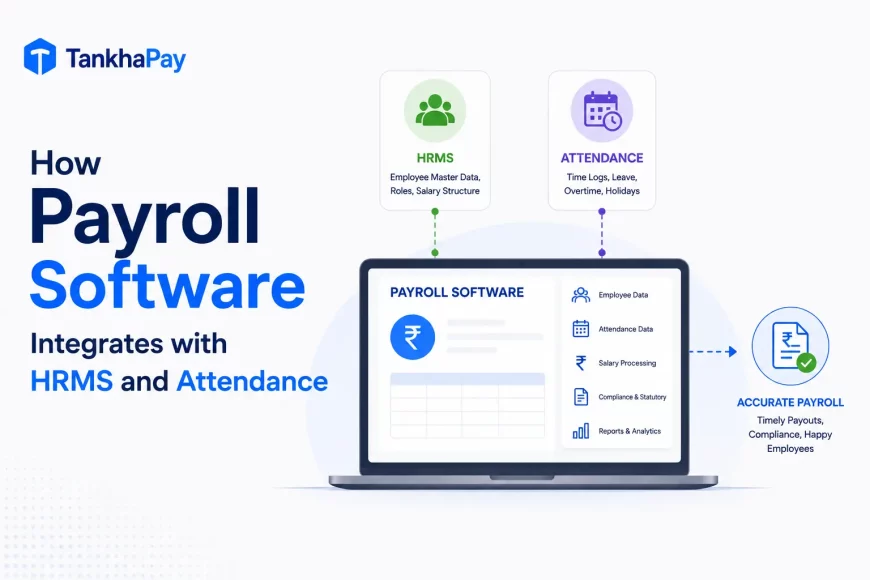
Payroll software integrates with HRMS and attendance by consuming their data at a fixed cut-off. Employee master data comes from the HRMS, and time and presence data from the attendance system, transferred through APIs, native connectors or scheduled file exchange.
Subsequently, payroll applies the leave policy and calculates payable days and pays. What should be remembered here is the direction of the flow.
Payroll is a downstream process. It is not a source of information. It takes the data provided by other systems and turns it into pay. And this brings us to the rule which shall guide every integration decision made from here on out: the output of payroll is as good as the input data which comes to it from the upstream systems.
A properly set-up payroll system with bad attendance data will give you the wrong payslips with confidence.
What is payroll, HRMS and attendance integration?
Three systems, three distinct jobs. Integration ensures that this happens so that data flows from one to another without anyone transporting it physically. Knowing the role of each system clarifies the importance of integration.
- HRMS holds employee information: who works here, who does what, where he/she works, on what compensation scale, when did he/she join, and on what basis. This is the official record of the employee.
- Attendance management holds time and presence information: who was present, when, for how long, on which shift, and who was absent. It is the system of record for time.
- Payroll software converts those two inputs into money and statutory obligation: payable days, wages, deductions, net pay, and forms to be filed by each agency. Integration is the process which transfers information from one database to another; it may be through API, a native link, middleware, or file transfer. However, without integration, the connection remains intact. It is done manually every month by a human being.
Payroll data chain
Payroll is at the tail end of a process, and each link decides what the next will get. To label the process is the quickest way to pinpoint a payroll issue. These are errors in the input data process which payroll simply did the math on.
The chain runs:
Employee → HRMS → Attendance → Leave and overtime → Payroll engine → Statutory compliance → Net pay → Accounting and ERP → Reporting
If read backward, the diagnostic significance is revealed.
- A wrong journal entry indicates payroll processing output.
- An incorrect net pay calculation indicates the payroll engine or input errors into the payroll engine.
- An incorrect payable period indicates leave and attendance.
- An incorrect employee category indicates the HRMS system.
This is why payroll automation is not primarily about automating salary calculation. The calculation was never the hard part. Payroll automation is about establishing a reliable flow of employee, attendance, leave, compensation and financial data into the payroll engine. That reframing has a practical consequence. If your payroll problems are recurring, the fix is usually upstream of payroll, and replacing the payroll system will not touch it.
How the integration works, step by step
Seven stages, from employee record to accounting entry. Each has a defined input, a defined output, and a defined way it fails. The stages below describe the common pattern. Specific behaviour varies by platform and configuration.
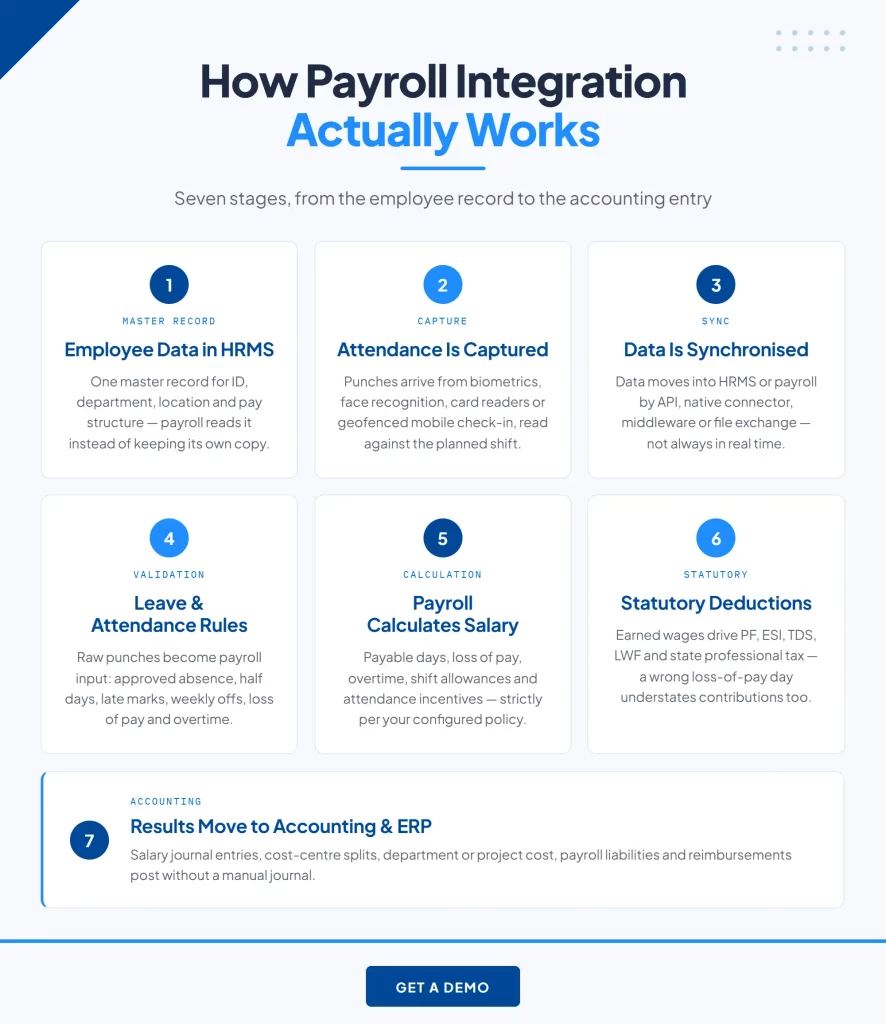
Step 1: Employee data is maintained in the HRMS
This is where the Master Record is kept: ID number, name, department, job title, location, join date, employment status, pay system, and employment status in payroll. Payroll does not keep its own separate record but uses the record of the HRMS. This inconsistency takes place when both the systems have their own record and it appears on the payslip. Failure happens when there is a transfer, promotion, or any pay transaction done in the HRMS within the month.
Step 2: Attendance is captured
Time and attendance data are captured from the point of work using biometric fingerprint scanners, facial recognition technology, card readers, online check-in, mobile apps or mobile capture geofencing. Shift planning and scheduling go hand-in-hand with this to establish what the particular punch time is all about. Shortcomings of this method include failure to capture punches, breakdown of the devices, and modifications of the shift schedule in the field.
Step 3: Attendance data is synchronised
The data then flows from the attendance system into the HRMS or directly into the payroll module. There are various methods and different platforms. An application programming interface enables the flow of data from one system to another programmatic, either continuously or on a schedule.
- The native connector is a pre-defined connector between two particular products.
- The middleware is a layer between the two systems that cannot interact directly.
- The file exchange is a way in which the data flows as structured files in a scheduled way.
- The direct database integration is possible in certain architectures but rarely used in modern cloud architectures.
Two things are important to note, which are often unclear due to vendor terminology. Integration is not necessarily in real time, and a shared database is not a must for a particular platform. Things go wrong: A synchronization process running after the payroll deadline or failing silently and detected only if something seems off with the numbers.
Step 4: Leave and attendance rules are applied
The raw attendance record is still not used in the payroll system since it requires some interpretation on the basis of organizational policy. The approved absence is segregated from unapproved absences. The half days, late arrivals, early departures, weekly offs, and holidays are all classified. Loss of pay days are determined. Overtime hours are segregated from regular hours.
This is the validation process, and this is where the true labor is done by humans. Integration gets rid of the transfer of data. It does not get rid of the evaluation of the data. Punches that have been missed will require regularizing, exceptions will require approval, and disagreements will require resolution. Any vendor who says that integration means there is no monthly effort at all is simply talking about transfer under the guise of validation. Failure point: Volume of exceptions surpassing the amount of time available before the cutoff.
Step 5: Payroll calculates the salary
Using the validated input data, the payroll engine performs calculations for payable days, salary structure, overtime and shift-related pay, and deduction. Attendance-based input data influences payable days, loss of pay, overtime pay, shift allowances, and incentives based on attendance that an organization uses.
A critical point to make here. The influence of being late, leaving early, or taking half a day off pay is determined only by the policy configured in your organization. There is no universal formula that payroll software uses; rather, it uses your own policy.
What does not work? The policy configured in the attendance system is different from the policy configured in payroll.
Step 6: Statutory calculations are applied
Once the earnings have been determined, the statutory deductions are made depending on the amount of salary earned. This includes the PF, ESI, Tax Deductible at Source, and Labour Welfare Fund in India, and professional tax in those states where the same is levied. All deductions are made depending upon various bases and various jurisdictional levels.
The dependency runs in one direction: as these are based on actual wages that can be earned, any incorrect recording of loss of pay day will not only result in incorrect statutory value. Incorrect recording of loss of pay day not only affects the salary of the employee; it will also result in understatement of contribution. The rates and values at present should be cross-checked with EPFO, ESIC, and Income Tax Department.
The exception is: State-wise contributions like Professional Tax and Labour Welfare Fund based on head office location rather than on individual work state.
Step 7: Payroll results move to accounting and ERP
The final step brings payroll production data to the financial system in the form of salary journal entry, cost centre distribution, employee cost per department or project, payroll liability and reimbursement. The cycle is completed in such a way that labour cost gets to be reported in the financial statements without making a manual journal entry.
What breaks the process? A change in the chart of account that is not made in the payroll’s map configuration.
What attendance data flows into payroll?
The table below lists the attendance inputs payroll consumes and what each one can affect. Note the word “can”. Every row depends on configured policy, and two organisations using identical software will treat the same input differently.
| Attendance input | Potential payroll impact |
|---|---|
| Present days | Payable days |
| Absence without approved leave | Possible loss of pay |
| Approved leave | Paid or unpaid treatment per policy |
| Late arrival | Depends on configured attendance policy |
| Early departure | Depends on configured attendance policy |
| Half-day | Payable day adjustment |
| Overtime hours | Additional earnings at the applicable rate |
| Shift worked | Shift differential where applicable |
| Weekly off | Applied per configured rule |
| Public holiday | Holiday pay or overtime rule |
| Missed punch, unresolved | Held as an exception, or treated as absence per policy |
That last row is worth attention. How a system treats an unresolved missed punch at cut-off is one of the most useful questions to ask a vendor, and one of the least often asked.
How biometric and GPS attendance integrate with payroll
The capture process depends on the type of workforce, but the route to the payroll is consistent for all. The chain run:
Device or application → Attendance system → HRMS or integration layer → Payroll engine
Biometric and device-based attendance
The fingerprint reader, facial recognition system, and card reader identify the presence at the location that is static in nature, i.e., the gate or entry point. The integration takes place using a device connector or a local agent through which the punching details are pushed to the attendance management system that syncs with the HRMS/ Payroll system. Facial recognition systems are favored in places where hygiene is an issue.
Mobile and GPS attendance
Geofenced mobile check-in creates presence for individuals that do not punch in at a static point: field salespeople, service engineers, drivers, and site managers. The geofenced check-in app creates presence along with the punch, which makes the proof of presence valid. Without that, field presence becomes a claim.
Where mixed capture matters
Organizations which employ a remote workforce will require more than one solution; moreover, not all platforms support multiple data captures in one payroll processing cycle. This becomes very important when discussing industries such as manufacturing, logistics, construction, retail, hospitality, healthcare, or any other sector that operates in multiple locations. Usually, the manufacturer will be using biometrics at the plant gate and geofenced mobile for site supervisors working on different sites.
How leave management integrates with payroll
Leave is the second input stream to payable days, and it has an interaction with attendance rather than working parallel to it. This process is quite easy in concept and causes almost all exceptions.
- Employee requests – manager accepts or rejects
- Leave balances updated – Payroll gets the approval status
- Payable days and pay deductions calculated.
These differences matter to payroll:
- Paid leave within balance reduces the leave balance without reducing pay
- Leave without pay decreases the number of payable days.
- Unauthorized absenteeism will be dealt with based on company policy, and it will result in loss of pay
- Late application for leave does not have to be accepted. It depends on the system configuration.
When attendance and leave are kept in different modules, they do not agree. HR’s leave module shows there are four days left, while payroll’s attendance sheet shows two. Whichever process the salary is, it will be correct. The employee can see this in the payslip.
How loss of pay is automated through attendance and leave integration
“Loss of pay” constitutes one of the major reasons for payroll controversies in Indian companies, but the calculation itself is never at fault. The formula is: Attendance and leave details – Policy guidelines – Number of payable days – Loss of pay – Net salary.
Payroll integration with expense reimbursements
Some organisations process authorised expense reimbursement through payroll, while some process them independently. Either way is correct. If expense reimbursement is processed, the cycle would be expense claimed – authorised – goes through payroll as input – gets processed alongside the salary.
The benefit here is processing with one single payroll cycle, which means less paperwork and accounting entries. The point here is that expenses are usually non-salary and thus should not be part of the calculation basis for the statutory deductions. Make sure this logic works with your payroll software.
Payroll integration with accounting and ERP systems
The process does not stop with net pay. Payroll output serves as financial information, and integration at this stage means that the finance department no longer has to prepare journal entries manually.
What moves in this direction:
- Salary journal entries
- Cost centre
- Department allocation
- Employee cost by project where relevant
- Payroll liabilities for statutory dues payable
- Reimbursement entries.
Integration methods mirror the upstream side: API calls, native connectors for particular accounting systems, middleware, or batch file transfers when there is no way to link directly. The mapping process is what the organizations underestimate. The mapping must be maintained if anything is changing on either side. If the chart of accounts is updated but not mapped in the payroll system, postings will go wrong until someone finds out.
API versus file-based integration
The integration approach is a true alternative and not a hierarchy, and the answer depends upon the nature of the integration. Both methods are fine. They just fail in different ways, and it is important to know how.
| API or connector-based | File-based exchange | |
|---|---|---|
| How data moves | Systems exchange data programmatically | Structured files exported and imported |
| Frequency | Continuous or scheduled | Scheduled or manual |
| Manual handling | Minimal once configured | Export, check and import each cycle |
| Setup effort | Higher initially | Lower initially |
| Failure mode | Silent failures if unmonitored | Version confusion, stale files, transformation errors |
| Legacy compatibility | Requires an available interface | Works with almost anything |
| Audit trail | System-logged | Depends on file handling discipline |
| Best suited for | Frequent updates, large volumes, several locations | Legacy systems, low volume, infrequent exchange |
It is not necessarily bad to perform file-based integration. File-based integration is justified where there is no interface available, the volume is low, or the frequency of communication is rare. It becomes expensive when it is performed on a monthly basis due to the presence of manual intervention in every instance, which has an associated error rate. Just one thing regarding the usage of the API. An integration that remains unmonitored and fails quietly is better than a manual integration that fails loudly.
What happens when payroll and attendance are not integrated?
The connection still exists. A person does it manually each month. The manual process usually goes through these steps: attendance system – exported file – review for missing data – cleansing data using a spreadsheet – matching with leave records – importing into payroll – checking for any errors – recalculating – approval.
Nine steps are done each month, most of them done again when things do not match. The operational cost is incurred in particular areas:
- Duplicate data entry across systems that hold the same employee twice
- Reconciliation effort, which is distinct from data entry and usually larger
- Delay, because the sequence has to complete before payroll can run
- Mismatch between systems, which surfaces as a payslip query
- Loss of pay and overtime errors, which are the two most disputed components
- Audit difficulty, because reconstructing how a figure was derived means retracing spreadsheet steps
Benefits of integrating payroll with HRMS and attendance
Every benefit mentioned here can be attributed to a particular improvement in the way data is being transferred. Statements about efficiency do not help at all when making your internal argument. This ranking represents how organizations usually recognize these things.
- Reconciliation disappears, not just data entry. The monthly checking and matching between systems is removed because there is one authoritative record rather than two being compared.
- Payroll errors fall at the source. Manual transfer is where most attendance errors enter. Removing the transfer removes that error class.
- Processing is faster because the sequence is shorter. Payroll can begin as soon as validation completes, rather than after export, cleanup and import.
- Loss of pay is calculated consistently. One configured convention applied identically every month, rather than a per-cycle judgement.
- Over-time and shift premiums are automatic. Since the punch will decide which shift an employee worked, there is no dependence on manual tagging of changes on rosters for making any allowances.
- The employee data remains constant. A transfer or adjustment made in only one system propagates, instead of requiring duplication in two systems with potential inconsistency.
- Statutory computation depends on valid data. The contributions computation depends on the actual salaries payable, and thus accurate attendance ensures accurate contributions.
- Multi-location attendance is achieved. Attendance data from multiple locations can be consolidated in one payroll report instead of many reports.
- Audit trail becomes feasible. A wage amount can be traced to the payable days and eventually to attendance records without building a spreadsheet.
- Linearity in scale ends. The more people and locations you have, the more effort required for manual reconciliation.
Why HRMS and attendance integration matters more for enterprise payroll
Integration is useful at every scale. It becomes structural at complexity, and complexity is not the same as headcount. The governing principle: the more systems and locations involved, the more expensive manual reconciliation becomes, and the growth is not linear. Enterprise payroll typically involves several conditions at once:
- Various sites, each having its own attendance equipment
- Various legal entities having different statutory registrations
- Varying shifts in different sites
- Different leaves rules depending on level or site
- Various payroll sections
- Cost center/project allocation
- Various approvals depending on position within organization
- Data volume, which makes use of spreadsheets impractical
- ERP interface needs
- Audit/access control compliance
A centralised report in conjunction with a statutory output of individual entities Every one of these can be managed easily without much difficulty. The combination leads to a reconciliation workload which scales up much faster than the number of people does, since every additional system increases the number of matching pairs exponentially.
It is the level at which integration ceases to become a nicety and becomes a mandatory element of the data architecture. Systems designed for such requirements include the enterprise payroll management software by TankhaPay.
How integrated payroll helps multi-location businesses
In those organisations where operations happen in multiple locations, attendance is recorded at those respective locations while the payroll is processed from a central system. The integration is what bridges the two. The process flow is:
- Attendance at each respective location
- Centralised HRMS
- Payroll calculation engine
- Results consolidation.
Without it, there will be one file created at each location, and these will have to be consolidated by some means. With integration, the same record is created at each respective location and is read once by the payroll system. This is most significant in manufacturing, retail, logistics, construction, hospitality, health care, and staffing industries where there are multiple sites with shift workforces.
Integrated payroll versus standalone payroll
Integration capabilities make the difference, not categories of products. There are some single payroll applications that integrate well and there are also some integrated systems that integrate poorly. The chart shows general roles, not universal ones.
| Capability | Standalone payroll | Integrated payroll |
|---|---|---|
| Employee data sync | Manual entry or periodic import | Single master record |
| Attendance sync | File export and import | Direct or scheduled synchronisation |
| Leave sync | Separate tracking, manual reconciliation | Shared record |
| Loss of pay automation | Manual computation or import | Rule-based from validated attendance |
| Overtime inputs | Manually supplied | Derived from punch data |
| Manual data transfer | Required each cycle | Removed |
| Reconciliation effort | Recurring monthly | Largely eliminated |
| HRMS integration | Varies, often absent | Native or connector-based |
| Accounting and ERP integration | Often manual journal | Automated posting |
| Multi-location visibility | Consolidated manually | Consolidated in system |
| Scalability | Effort grows with headcount and sites | Largely independent of scale |
| Error risk | Concentrated at transfer points | Concentrated at validation, which is reviewable |
Note the final row. Integration does not eliminate error risk. It moves it from an invisible place, mid-transfer, to a visible one, at validation, where somebody can review it.
What to look for in payroll software with HRMS and attendance integration
Twenty-one elements, divided according to what they protect. It should be used for evaluation purposes and not as a list of features. All suppliers will answer positively to all these points, but the follow-up question within each category is the one that counts.
Data connectivity
- HRMS integration, native or through a documented interface
- Biometric and device integration, with your specific device types named
- Mobile and geofenced attendance capture
- Availability of application programming interface documentation
- Synchronisation frequency and ability to configure the synchronisation
- Mixed support for capturing attendance in one payroll run
Ask: which specific attendance devices do you integrate with directly?
Payroll logic
- Remove synchronisation with balance visibility
- Lack of payroll automation with the convention being configurable
- Calculate overtime using the applicable statutory rate
- Manage shifts with automatic shift detection from the punch time
- Synchronise the employee master across systems
- Pre-payroll validation and exception reporting
Ask: What is the lack of payroll convention, and can it be changed?
Downstream integration
- Accounting integration with cost centre mapping
- ERP integration where required
- Bank file generation in the required format
Ask: What happens to the mapping when our chart of accounts changes?
Governance and operations
- Support for multiple locations and multiple entities
- Role-based security
- Unalterable audit trail
- Error reporting and detection of integration failure
- Integration monitoring to catch failures silently
- Cross-location/entity reporting
- Scalability without redevelopment
Ask: how are we notified when a synchronisation fails? That last question is the one most buyers skip. A silently failed integration is discovered on payslips, which is the most expensive possible place to discover it. More detail on evaluating capability sits in payroll software features.
What does a modern payroll integration architecture look like?
Described in plain terms, the architecture is a chain of systems with a defined handover at each step. Reading it top to bottom shows where each system’s data comes from and where accountability sits at each stage.
- HRMS, or employee master, holds who each person is, their role, location, salary structure and employment status. Attendance tracking and mobile applications collect presence data at the place of work.
- Attendance management module stores such data, applies shift rules and holds the raw time data.
- Iintegration layer facilitates movement of data from one system to another, which could be via APIs, native connectors, middleware or scheduled interfaces.
- Payroll engine takes input data and calculates earnings, deductions and net pay. Compliance and payroll validation uses legal logic and executes pre-payroll checks. Banking gets the payment instruction file. Accounting/ERP gets the journal entries and cost allocations.
There are two points about this chain that need to be highlighted clearly. Accountability sits with a different owner at almost every stage, which is why integration problems are often organisational rather than technical. And the chain has one direction: fixing a downstream symptom without correcting the upstream cause produces the same problem next month. Implementation sequencing for this architecture is covered in the payroll software implementation guide.
Conclusion
Payroll integration is not something you can compare in a chart. Payroll integration is about data movement within your organization and responsibility at the point of transfer.
Three lessons to take from this session:
- Payroll is downstream and therefore relies on the accuracy of the data from upstream processes. Integration is not only automation but also reconciliation of differences, which is the costly part of integration.
- Plus value derived from integration goes up at a faster rate than the number of users of the system since with every new system comes more pairs of differences that need to be reconciled.
How many hours do you spend every month transferring and reconciling attendance data, how many exceptions are received after cut-off, and how many corrections spill into the next cycle?
Those are the numbers that will tell you how valuable integration is to you. If payroll currently touches multiple locations, entities, or attendance systems, the integration layer is often where the work gets done. Schedule a Strategy Call and we will assess your current data flow before talking about platforms.
FAQs
How does payroll software integrate with HRMS?
The payroll gets employee master details from HRMS, including the employee number, department, location, salary structure, and status of employment. The link can be made through API, native connector, middleware, or file exchange to ensure that changes made once reflect throughout the system and not twice.
How does attendance integrate with payroll?
The attendance information is gathered at the time of work, synchronized with the HRMS or payroll and then evaluated according to the attendance and leave policy to calculate payable days, loss of pay, overtime, and shift payments. The payroll process uses this information in a fixed cut-off date.
How does attendance affect payroll?
The attendance decides the number of days to be paid, which impacts gross salary. Attendance also impacts any loss of pay and pay earned through overtime work. As statutory deductions are based on salaries payable, errors in attendance also affect Provident Fund and ESIC.
How is loss of pay calculated from attendance?
First, unauthorized absence is determined based on the calculation of leave rules, and then it is changed into a deduction. There are two methods for calculating the deduction: dividing the gross monthly salary by the number of days in a month or by the number of configured working days. The second method will yield a higher deduction amount for the same absence.
What data is transferred from attendance to payroll?
Present days, absence, authorized/unauthorized leave, half days, late arrival, early departure, overtime, shift worked, weekly off, and holidays. Based on the configured policy and not on the information itself.
What is payroll API integration?
An application programming interface allows two systems to exchange data programmatically rather than through file transfer. For payroll, this typically means attendance, leave and employee data moving automatically, either continuously or on a schedule you configure.
What is the difference between integrated and standalone payroll software?
“Standalone Payroll software will calculate the salary based on the information supplied by you. In contrast, integrated Payroll software will automatically take information from HRMS and attendance software.” This is because the difference lies in the integration capacity and not in the quality of software, as some of the standalone software packages integrate themselves well using interfaces.
Can payroll software integrate with accounting software?
Yes, many of the Payroll software packages have the capability to integrate themselves with Accounting software by entering the salary journal entries, Cost center entries, and Payroll liabilities.”
Can payroll software integrate with ERP systems?
These usually do, via documented interfaces or middleware. The point is to determine which particular ERP is used, what data is exchanged, and who manages the mappings. Make sure you know your particular system rather than assuming ERP compatibility.
How does payroll integration reduce errors?
By eliminating the manual step where most errors in attendance occur, as well as the reconciliation process between databases that contain duplicate information. Mistakes do not go away but are rather moved to the validation stage, where they can be seen and reviewed.
What should I look for in payroll integration?
Device Compatibility, Availability of APIs, Configurable Frequency of Synchronization, Loss of Pay Convention Configurability, Accounting Mapping, and Failure Notification. The latter is frequently ignored, yet it is very important, as a failure will become apparent only when the payslips are printed out.