A company can process salaries correctly every month and still struggle during an audit. Accurate payroll and auditable payroll are not the same thing. If changes can’t be traced to who made them, if last year’s payroll figures can’t be reproduced, if payroll totals don’t tie back to the general ledger, or if approvals exist only as an assumption, an auditor has nothing to verify against, even when every payslip was correct.
The payroll program is auditor-friendly if it is capable of enabling the finance and audit staff to identify who performed the changes, trace it back to its time, simulate the payroll based on the then-rules of the organization, reconcile the payroll figures with the general ledger figures without having to recreate those, and retrieve documents that support the process without having to recreate them. Reporting does not provide any of those. An application can even generate numerous reports but fail in the audit because of lack of traces and reconciliation.
What Makes Payroll Software Auditor-Friendly?
A good audit system will give you version-controlled change history, recordable history which can be recreated, reporting that reconciles to accounting systems, access control and logging, and proof of authorization for everything. The test is not whether there is a report.
The test is whether that report stands up when you are asked, “How do you know that number is correct, and who authorized it?“
Test 1: The Audit Trail, Beyond “Does It Have One”
Almost all payroll applications say that they have an audit trail system. The question is how much they really keep track of and whether their record can be tampered with.
A useful audit trail records the user who made a change, the date and time, the specific action, the previous value, the new value, the approval status, and which payroll period the change affected. Anything less than that is a change log, not an audit trail.
Scenario to test: The monthly salary of an employee is increased from Rs. 60,000 to Rs. 70,000 in the middle of the year. Can the financial department track back who has made the changes, when, how many times and at which first payroll run this change is implemented without IT extracting logs?
A more pointed question that should be asked of a provider is not whether their audit trail is immutable but whether a person who is authorized to use the system, an administrator, a superuser, or anyone for that matter, could change, disable, or delete audit records. The true answer to this question should definitely be considered.
Test 2: Can You Reproduce a Historical Payroll Run
This is the section most evaluations skip, and it’s usually where audits actually stall.
There are changes in the payroll laws. The limits on PFs are changed; there is an update on PT slabs; TDS regulations change. The figure determined for payroll in the month of March is based on the rules that were existing in the month of March itself and not based on the rules that exist when an auditor questions it after eight months. This ensures point-in-time reproducibility of the system that can demonstrate to you what the law was used at that time.
Scenario to test: The auditor requires payroll information from the previous months for one month during the year. Can you provide him with exactly the same report, exactly the same salary structure that was in place at that time, and the deduction rates used then, or does your giving him that answer involve having to manually reconstruct the entire process? A system that only presents current state information—current salary, current PF rate—will present an answer to this question that is plausible but incorrect.
Test 3: Do the Reports Actually Verify Something
The only thing that will make a report meaningful for the auditor is if the report supports a certain statement. Assess each report based on its support, not existence.
- Payroll register: supports the fact of how much and to whom payment was made, and when
- Gross-to-net report: supports the process of deducting each deduction from gross salary
- Payroll journal: verifies how a payroll run translates into accounting entries
- Variance report: checks if this cycle’s figures match those of previous cycles, or where they do not
- Department or cost-center reports: checks if payroll cost allocation is correct according to the organizational structure
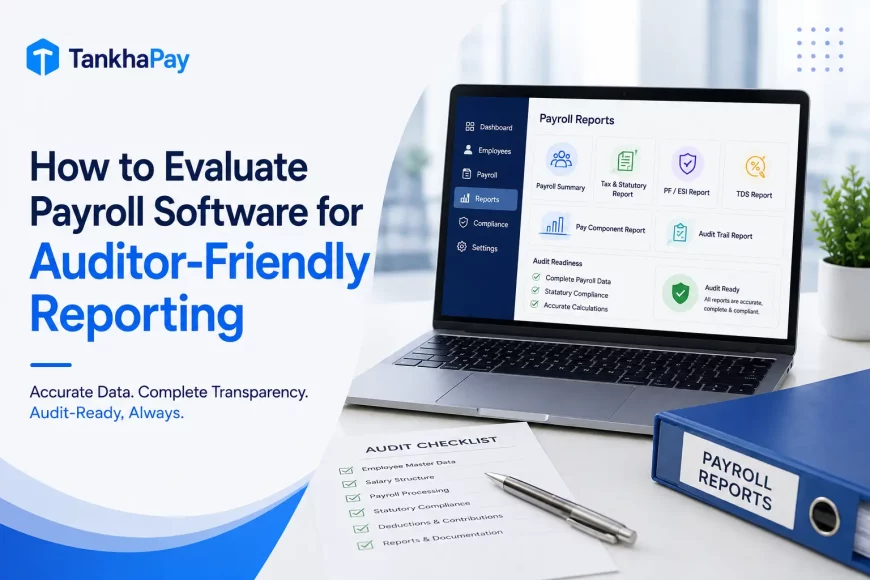
- Statutory reports: verify what was deducted and remitted against what regulations required
If a platform can generate a report but can’t explain what it’s meant to prove, it’s decoration, not evidence.
Test 4: Payroll-to-Accounting Reconciliation
This is the part that CFOs care about the most, since here the payroll figures reconcile or fail to reconcile with the books of accounts.
The information should pass smoothly from one place to another, starting from the calculations done for the payroll of employees, which leads to the preparation of the payroll register, followed by the payroll journal and then posting in the general ledger.
Scenario to test: There is one total from the payroll and another from the accounting ledger.
- Does finance have the means to determine the exact nature of this discrepancy?
- A matter of timing, an accrual that was missed, some manual override – without having to go through the process of reconciling by hand for the entire month?
If there is a direct integration between the payroll software and the accounting or ERP system, this will almost be an automatic process.
Test 5: Statutory and Compliance Reporting
With regard to Indian payroll, it is PF, ESI, TDS, Professional Tax, and LWF depending on the cases, together with the corresponding registers and reports associated with the same. In the case of evaluation, it is not an issue of whether the software is able to calculate these things properly, but it is the issue of whether there are any documents available for the review.
Test 6: Role-Based Access and Approval Controls
Separation of duties is expected in an auditing process. In that case, there must not be one individual who enters payroll information and approves disbursements. Determine whether there is maker-checker functionality when changing salaries and approving bank files, whether access to sensitive payroll information is restricted, and whether approval of each payroll processing is tracked.
Test 7: Exception and Variance Reporting
This is different from pre-run checks which identify glaring issues within the data prior to running a payroll. Exception reporting tends to be a backwards-looking function over cycles, identifying such issues as large increases in salaries, large month-to-month fluctuations, unusual deductions, dramatic changes in headcount, and odd overtime. This is not intended to find any signs of fraud, as no payroll software should ever claim to do so.
Test 8: Export and Evidence Retrieval
Your auditors must be able to work independently with the data rather than simply viewing the data within your system. Make sure that payroll registers, audit trails, history reports, and other supporting documentation can export easily into Excel, CSV, or PDF format. A system where all information is kept internal makes this more difficult.
Test 9: Security and Access History
Ensure there is an access control to the sensitive payroll data with respect to date and time of access apart from just editing. This is very important at this stage with respect to role-based permission and auditing. Watch out for vendors who give you “absolutely secure” and “compliance guaranteed” assurances.
Payroll Software Audit-Readiness Checklist
| Evaluation Area | What to Check | Why It Matters |
|---|---|---|
| Audit trail | User, timestamp, old and new values, whether entries can be altered | Change traceability |
| Historical records | Whether a past payroll run can be reproduced using rules in effect then | Audit evidence |
| Reporting | Whether each report verifies a specific claim | Independent verification |
| Reconciliation | Payroll register to journal to GL, without manual rework | Financial accuracy |
| Approvals | Maker-checker process, sign-off documentation | Internal control |
| Access | Role-based access control, access logging | Data governance |
| Variance reporting | Unusual changes flagged across cycles | Review and risk detection |
| Export | Clean Excel/CSV/PDF format | Independent audit analysis |
| Compliance | PF, ESI, TDS, and PT records retrievable on demand | Statutory review |
| Integrations | HRMS, accounting, ERP data consistency | Reduced reconciliation gaps |
Few Audit-Specific Questions Worth Asking a Payroll Vendor
This isn’t a full vendor evaluation checklist; TankhaPay has a dedicated 20-question guide for that. These are the ones specific to audit readiness:
- Can you show the audit trail for an employee master-data change, including old and new values?
- Can a past payroll run be retrieved and reproduced using the rules that applied at the time?
- Can payroll be reconciled against the general ledger without manual adjustment?
- Are payroll approvals recorded against a specific user, not just marked “approved”?
- Can audit logs and payroll registers be exported independently of the platform?
Should You Choose Payroll Software Based on Reporting Alone?
No. Reporting is just one component of an overall evaluation process that involves compliance accuracy, level of integration, scalability, security, and compatibility with the organization’s approval process flow. It could be possible to have a reporting system with great reports but poor reconciliation features or a compliance automation system with no audit trail feature at all. Auditability should just be one of many columns in the evaluation process.
Conclusion
The best payroll software for an audit may not be the one with the most features. Instead, the best software is one that enables the payroll information to be tracked, duplicated, reconciled, and accessed whenever the need arises, rather than simply producing reports whenever the system works perfectly.
TankhaPay’s payroll software logs payroll actions, edits, approvals, revisions, and payouts, with timestamps and user details, and generates statutory reports for PF, ESI, PT, and TDS as part of standard processing. If your finance or HR team is evaluating payroll software for stronger reporting, compliance, and audit visibility, that’s worth testing directly against the criteria above rather than taking it, or any vendor’s, feature list at face value.
FAQs
What is an audit trail in payroll software?
History of all payroll transactions, pay rate modifications, authorizations, revisions, including who made the transaction, when, and the value prior to and subsequent to any changes. A good audit trail includes sufficient data to answer the question “who changed this and for what reason” without further analysis.
What payroll reports do auditors typically need?
Payroll register, gross/net breakdown, payroll journal, legal reports (PF, ESI, TDS, PT), and allocation of amounts by departments or cost centers, each being prepared to substantiate a particular claim made regarding payments made.
How does payroll software help with payroll audits?
Through making alterations easily traceable, ensuring historical operations are reproducible and payroll information is verifiable through comparison with accounting information, minimizing the manual reconstruction of the audit response process.
What should I check in a payroll software audit trail?
If it tracks the user name, time stamp, action performed, previous and new values, and if users can make any changes to the audit trail.
Can payroll software reconcile payroll with accounting records?
Good systems can do it either through direct posting or via ERP integration that will post payroll journal entries automatically. When this is not available, reconciliation will remain manual and become an ongoing issue in audits.
Why is historical payroll data important during an audit?
Because the payroll regulations keep changing over time. The auditor performing an audit on a previous period will need the regulations and rates prevailing at the time and not the current ones applied retrospectively.
What compliance reports should payroll software provide in India?
Supporting reports and registers for PF, ESI, TDS, and professional tax liabilities, which are available on demand, were not only created at the time of filing.
How do I compare payroll software for finance and audit requirements?
Do not test the capabilities list; test these particular cases: track a salary change, resolve the payroll-GL discrepancy, and find an old payroll run. These three examples will reveal more about the system than any demonstration ever can.